

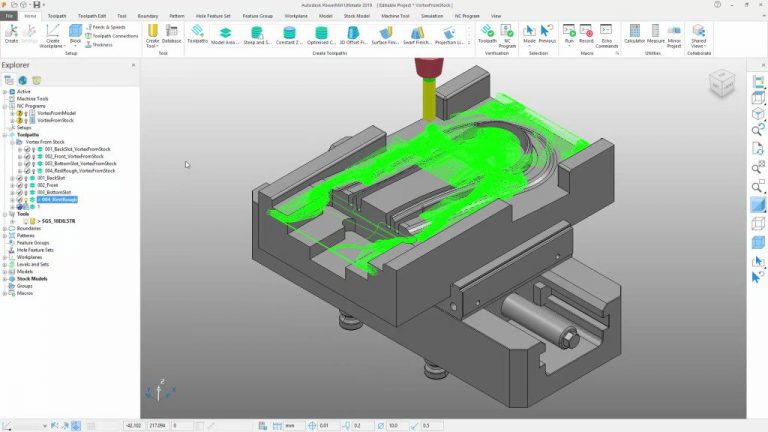
Download Autodesk PowerMill Ultimate 2026 – Advanced CAM Software for CNC Machining
Autodesk PowerMill Ultimate 2026 is a sophisticated 3D Computer-Aided Manufacturing (CAM) software developed by Autodesk, building on the legacy of Delcam’s advanced CAD/CAM solutions. This powerful CAM software is designed for advanced manufacturing and CNC machining, enabling precise tool path programming for 2 to 5 axis milling machines. It is crucial for professionals in fields such as aerospace, automotive, and mold making, where optimizing manufacturing time and cost while ensuring high-quality finishing are paramount.
Introduction to Autodesk PowerMill Ultimate 2026 and Its Applications
Autodesk PowerMill Ultimate 2026 stands as a leading solution in the advanced manufacturing sector, offering specialized capabilities for complex CNC machining operations. Developed to address the rigorous demands of modern manufacturing environments, the software facilitates the creation of highly efficient and accurate tool paths. Its integration into workflows across industries like aerospace, automotive, and mold/tooling demonstrates its versatility and essential role in producing intricate components with precision and speed.
Advanced Tool Path Programming and Optimization Techniques
PowerMill excels in programming for 2 to 5 axis CNC milling machines, providing users with a comprehensive suite of tools to generate optimized tool paths. The software utilizes advanced algorithms for tool path optimization, which are critical for reducing machining cycle times, minimizing tool wear, and improving surface finish. These techniques are especially valuable when working with complex geometries and high-performance materials commonly found in demanding industrial applications.
- Supports programming for 2-axis through to 5-axis simultaneous CNC milling.
- Offers a variety of machining strategies tailored for different materials and component features.
- Implements sophisticated algorithms for tool path optimization to enhance cutting efficiency.
- Features advanced collision detection to ensure safe and accurate machining operations.
Key Features and Capabilities of PowerMill
Autodesk PowerMill Ultimate 2026 integrates a wide array of features designed to enhance the entire machining workflow. From initial machine control to final simulation and verification, the software aims to maximize productivity and ensure high-quality output. Its capabilities are geared towards tackling the most challenging manufacturing tasks with advanced technology.
- Machine Control: Provides detailed control over CNC machine kinematics and behavior for accurate tool path generation.
- Efficiency Improvements: Utilizes advanced tool path optimization to significantly reduce machining times and operational costs.
- Simulation Tools: Offers robust simulation capabilities to preview machining processes, identify potential issues, and verify accuracy.
- Graphic Displays: Features advanced graphic displays for visualizing tool paths, material removal, and simulation results clearly.
- Multiple Machining Strategies: Incorporates diverse strategies such as high-speed machining (HSM), multi-axis milling, and cavity milling.
Industry Applications and Case Studies
The advanced capabilities of Autodesk PowerMill Ultimate 2026 make it indispensable across several key industries. Professionals rely on its features to overcome complex manufacturing challenges and achieve superior results.
- Aerospace: Used for precision machining of turbine blades, structural components, and complex aerospace parts requiring tight tolerances and superior surface finishes.
- Automotive: Employed in the manufacturing of engine components, molds for car body panels, and other high-precision automotive parts where efficiency and accuracy are critical.
- Mold Making and Tooling: Widely adopted for the intricate machining required in creating complex molds and tooling, optimizing for speed and intricate detail.
Integration with Other Autodesk Products and Tools
Autodesk PowerMill Ultimate 2026 is designed to integrate seamlessly within the broader Autodesk ecosystem, creating a connected workflow for product development and manufacturing. This integration allows for enhanced data management and process optimization.
By connecting with design software such as Autodesk Inventor and Fusion 360, PowerMill facilitates a smooth transition from CAD models to executable CNC programs. This interoperability supports efficient data transfer, reduces the potential for errors, and streamlines the overall product realization process, maximizing productivity from design to final production.
Simulating and Validating Tool Paths for Enhanced Accuracy
Accurate simulation and validation are critical steps in the CNC machining process. Autodesk PowerMill Ultimate 2026 provides powerful simulation tools that allow manufacturers to predict and verify machining outcomes before operations begin on the shop floor, thus preventing costly errors and ensuring component quality.
The software enables realistic simulation of the entire machining process, including detailed analysis of tool-to-part and tool-to-machine collisions. This feature helps in identifying potential clashes, optimizing feed rates, and ensuring that the final machined part meets precise specifications, thereby increasing confidence in the manufacturing process and reducing the need for physical test runs.
Conclusion and Getting Started with PowerMill
Autodesk PowerMill Ultimate 2026 offers a comprehensive and powerful solution for advanced CNC machining, characterized by its sophisticated tool path optimization, robust simulation capabilities, and broad industry applicability. Its design focus on efficiency and precision makes it an invaluable asset for manufacturers seeking to enhance their production processes and deliver high-quality components.
Exploring PowerMill’s features further, including its specialized machining strategies and integration potential, is recommended for any organization involved in complex manufacturing. Understanding its capabilities can unlock new levels of productivity and precision in CNC machining operations.
Frequently Asked Questions
What is the primary use of Autodesk PowerMill?
Autodesk PowerMill is primarily used for programming CNC milling machines, allowing for the optimization of tool paths to improve machining efficiency and surface quality. It enables users to generate precise instructions for 2 to 5 axis CNC machines, ensuring optimal performance and finish on manufactured parts.
How does PowerMill enhance manufacturing efficiency?
PowerMill enhances manufacturing efficiency by providing advanced path optimization strategies that reduce machining time and tool wear, leading to lower operational costs. Its ability to create more direct and efficient tool paths minimizes non-cutting movements and reduces the overall cycle time for complex parts.
Can PowerMill be integrated with other Autodesk products?
Yes, PowerMill can be integrated with other Autodesk products, facilitating a streamlined workflow for design and manufacturing processes, thereby optimizing productivity. This integration allows for smoother data transfer and better collaboration between design and manufacturing teams, enhancing overall project efficiency.






Reviews
There are no reviews yet.