

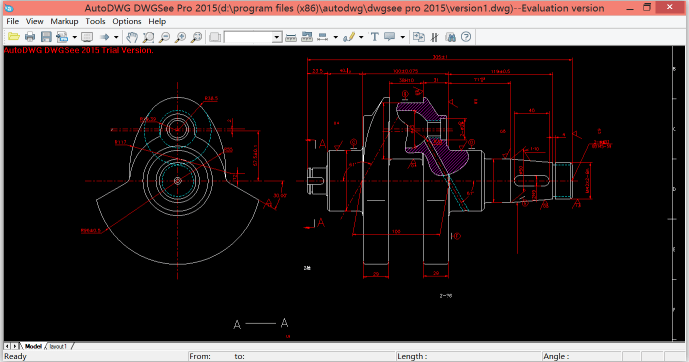
Download AutoDWG DWGSee Pro 2027 – Efficient CAD File Viewer and Printer
AutoDWG DWGSee Pro 2027 is a professional CAD file viewer and markup tool developed by AutoDWG, designed specifically for the engineering, architecture, and design industries. This application serves as an efficient solution for professionals who need to view, measure, and print CAD files, particularly the popular DWG format, without requiring the full functionality or heavy system resources of complex CAD software like AutoCAD. It provides essential tools for quick design visualization and assessment, making it a valuable asset for effective workflow management.
Overview of AutoDWG DWGSee Pro 2027
Introduction to CAD Viewing Solutions
In the fields of engineering, architecture, and manufacturing, the ability to accurately view and interpret computer-aided design (CAD) files is crucial. While powerful design suites exist, many professionals require specialized, lightweight tools for specific tasks such as reviewing, measuring, or printing drawings. AutoDWG DWGSee Pro 2027 addresses this need by offering a focused and efficient solution. It provides capabilities for handling common CAD file formats, enabling users to access and interact with design data more effectively and with fewer system demands compared to full-fledged CAD applications.
Key Features and Capabilities
Measuring and Annotation Tools
AutoDWG DWGSee Pro 2027 is equipped with a robust set of tools designed for detailed analysis and markup of CAD drawings. These features support professionals in verifying designs and communicating feedback efficiently.
- Precise Measurement: The software includes specialized tools to measure lengths, perimeters, areas, and angles directly on the drawing canvas, facilitating quick design assessments.
- Markup and Annotations: Users can add notes, text callouts, and graphical shapes to drawings, enabling collaborative review processes and documentation of design changes without altering the original CAD data. These annotations can be saved alongside the drawings.
- File Comparison: A key capability allows for visual comparison between two versions of a drawing file, highlighting differences in geometry and content to simplify review processes.
File Compatibility and Formats
Ensuring broad compatibility with industry-standard CAD file types is essential for seamless integration into existing design workflows. AutoDWG DWGSee Pro 2027 supports a comprehensive range of formats, accommodating both legacy and current design data.
- DWG Support: Native support for DWG files, from older versions (R2.5) up to the more recent 2017 format, ensures access to a vast library of existing designs.
- DXF and DWF Compatibility: The software also handles Drawing Exchange Format (DXF) and Design Web Format (DWF) files, providing flexibility for users working with data from various CAD applications.
- Other Formats: Additionally, DWGSee Pro can view bitmap images like BMP, JPG, and GIF, further expanding its utility for visual asset management.
Use Cases in Different Industries
The practical application of AutoDWG DWGSee Pro 2027 spans various sectors within engineering, architecture, and manufacturing, where efficient access to CAD data is paramount.
- Engineering Design Review: Engineers can quickly open and review complex mechanical or electrical designs, use measurement tools to verify dimensions, and add annotations for feedback to the design team.
- Architectural Site Analysis: Architects and construction professionals can utilize the viewer on-site to access blueprints, check measurements for existing structures, or review architectural plans without carrying bulky paper copies or requiring a powerful workstation.
- Manufacturing Quality Control: Quality control inspectors can use the software to compare manufactured part drawings against design specifications, identifying any discrepancies through visual inspection and comparison tools.
- Logistics and Printing: For tasks requiring simple printing or conversion of CAD files to common formats like PDF or JPG, the software offers a straightforward solution, reducing the need for complex CAD software for output preparation.
Comparison with Other CAD Viewing Software
AutoDWG DWGSee Pro 2027 distinguishes itself from other CAD viewing solutions through its strategic focus on performance and essential functionalities tailored for professionals.
Compared to full CAD suites like AutoCAD, DWGSee Pro offers a significantly lighter footprint and faster load times, making it ideal for quick reviews and users with less demanding hardware. While other CAD viewers might offer basic viewing capabilities, DWGSee Pro integrates specialized tools such as precise measurement functions, advanced file comparison features, and annotation capabilities that streamline the review and feedback process. Its emphasis is on providing core CAD file interaction utilities efficiently, rather than replicating the extensive design and editing capabilities of larger professional software packages.
Documenting Designs with DWGSee Pro
Beyond viewing and measuring, AutoDWG DWGSee Pro 2027 supports essential functions for documenting and sharing CAD designs, enabling professionals to integrate drawings into broader project documentation.
- Exporting Capabilities: Users can export CAD drawings to more universally accessible formats, including PDF, JPG, and PNG. This feature is invaluable for reports, presentations, and sharing designs with stakeholders who may not have access to CAD software.
- Batch Printing: The software allows for the batch printing of multiple drawing files, significantly improving efficiency when needing to produce hard copies of many related documents.
- Redlining and Markup Saving: Annotations and markup created within DWGSee Pro can be saved, either as a separate layer or embedded within the output file, ensuring that comments and revisions are preserved for project records.
Frequently Asked Questions
What versions of CAD files does DWGSee Pro support?
DWGSee Pro supports a wide range of CAD file versions, from AutoCAD R2.5 up to 2017, making it compatible with both older and newer design files. This broad compatibility ensures that users can effectively access and work with a vast history of CAD documentation.
How can I measure areas or lengths in DWGSee Pro?
The software includes tools for precise measurement of lengths, areas, and angles directly within the CAD file, allowing for quick assessments without needing full CAD software. Simply select the measurement tool and click on the relevant points or areas within the drawing to obtain dimensions.
Can DWGSee Pro annotate CAD drawings?
Yes, DWGSee Pro allows users to add annotations, including text and shapes, which can then be saved alongside the original CAD files without altering them. This feature is crucial for effective collaboration and feedback during design review processes.






Reviews
There are no reviews yet.