

Download Avenza Geographic Imager 6.6.1 for Adobe Photoshop – GIS Mapping Software
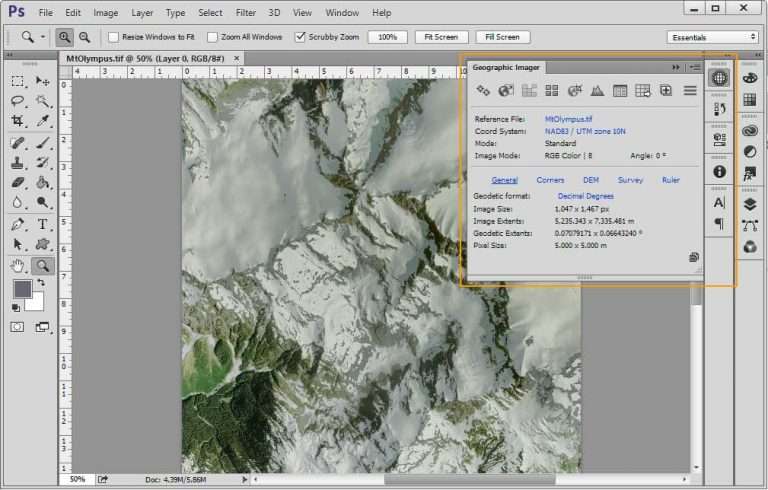
Avenza Geographic Imager 6.6.1 for Adobe Photoshop is a specialized geospatial software developed by Avenza Systems Inc. It extends Adobe Photoshop’s powerful image editing capabilities to the realm of geographic information systems (GIS). This plugin is designed for professionals in environmental studies, earth sciences, and GIS fields who require advanced tools for processing and analyzing spatial imagery directly within a familiar image editing environment.
Introduction to Avenza Geographic Imager
Avenza Geographic Imager bridges the gap between professional image editing and geospatial data management. By integrating directly into Adobe Photoshop, it allows users to perform complex edits on geographic imagery while maintaining critical spatial information. This makes it an invaluable tool for GIS practitioners, environmental scientists, and cartographers who need to work with spatial data in a flexible and powerful application.
Key Features and Editing Capabilities
Geographic Imager provides a suite of specialized tools that enhance Photoshop for geospatial tasks. Its robust feature set ensures that spatial data integrity is preserved throughout the editing process.
- Support for importing and exporting various geospatial raster file formats, including GeoTIFF and NITF.
- Tools for georeferencing raster images, allowing users to assign spatial information to images lacking it.
- Capabilities for reprojecting images between different coordinate systems.
- Advanced image manipulation tools within Photoshop adapted for spatial data, such as mosaic and clip functions.
- Features for updating and modifying georeferencing information within existing files.
Industry Applications and Use Cases
The versatility of Avenza Geographic Imager makes it applicable across numerous industries and academic disciplines that deal with spatial data. Its ability to leverage Photoshop’s editing power brings new possibilities to sophisticated image analysis.
- Environmental Assessments: Professionals use it to analyze satellite imagery for land cover change, deforestation monitoring, and impact assessments of environmental projects.
- Urban Planning: Planners utilize Geographic Imager to edit aerial photographs for zoning maps, infrastructure development planning, and land use analysis.
- Academic Research: Researchers in earth sciences and geography employ the software for analyzing geological formations, climate change effects on landscapes, and historical mapping projects.
- Cartography: Mapmakers can edit and prepare raster datasets for incorporation into larger map products, ensuring accurate spatial representation.
Integration with Adobe Photoshop
Geographic Imager’s seamless integration with Adobe Photoshop is a primary benefit, allowing users to employ one of the most recognized and powerful raster image editing platforms for geospatial work. This integration means that users do not need to switch between multiple complex software packages for diverse image processing tasks.
Photoshop’s advanced tools for color correction, retouching, and compositing can be applied to spatial images, while Geographic Imager ensures that all georeferencing and coordinate system information is accurately maintained and updated. This combined functionality streamlines workflows for creating high-quality, spatially accurate imagery.
Supported Formats and Coordinate Systems
To ensure broad usability for geospatial professionals, Avenza Geographic Imager supports a wide array of industry-standard raster file formats and coordinate systems. This compatibility is crucial for working with diverse datasets from various sources.
- File Formats: Includes support for GeoTIFF, NITF, GeoJPEG, JPEG2000, MrSID, ECW, PNG, and TIFF, among others.
- Coordinate Systems: Capable of handling a comprehensive list of projected and geographic coordinate systems, supporting transformations between them. It uses the PROJ.4 library for transformations, ensuring accuracy and compatibility with global standards.
Automating Tasks with Geographic Imager
For professionals working with large volumes of spatial data or repetitive editing tasks, Avenza Geographic Imager offers capabilities to automate workflows, significantly boosting productivity. This feature is particularly useful in environments where efficiency and consistency are paramount.
The software allows users to record and play back custom actions within Photoshop, which can include complex geospatial operations performed by Geographic Imager. This scripting functionality, combined with Photoshop’s inherent automation tools, enables the creation of robust, repeatable workflows for batch processing, data conversion, and systematic georeferencing.
Conclusion and Next Steps
Avenza Geographic Imager 6.6.1 provides essential GIS capabilities directly within Adobe Photoshop, empowering professionals to edit and manage geographic imagery with unprecedented flexibility and precision. Its robust support for various data formats, coordinate systems, and powerful automation features make it an indispensable tool for anyone involved in geospatial analysis, environmental studies, or cartography. For those seeking to enhance their spatial image processing workflows, exploring Geographic Imager is a highly recommended step towards greater efficiency and accuracy.
Frequently Asked Questions
What is Avenza Geographic Imager primarily used for?
Avenza Geographic Imager is used for editing and converting geographic and satellite images within Adobe Photoshop, allowing users to manage spatial data effectively without compromising its integrity. It enhances Photoshop’s image editing tools with geospatial functionalities.
Which file formats does Avenza Geographic Imager support?
The software supports various file formats including GeoTIFF, NITF, and MrSID, enabling users to import and work with diverse geographic images efficiently. It also handles formats like ECW, JPEG2000, PNG, and TIFF.
How can Avenza Geographic Imager enhance my workflow in GIS projects?
Geographic Imager automates tasks through scripting and integrates seamlessly with Photoshop, allowing for a more streamlined process in editing and managing spatial imagery in GIS projects. This reduces the need for multiple specialized software applications.




Reviews
There are no reviews yet.