

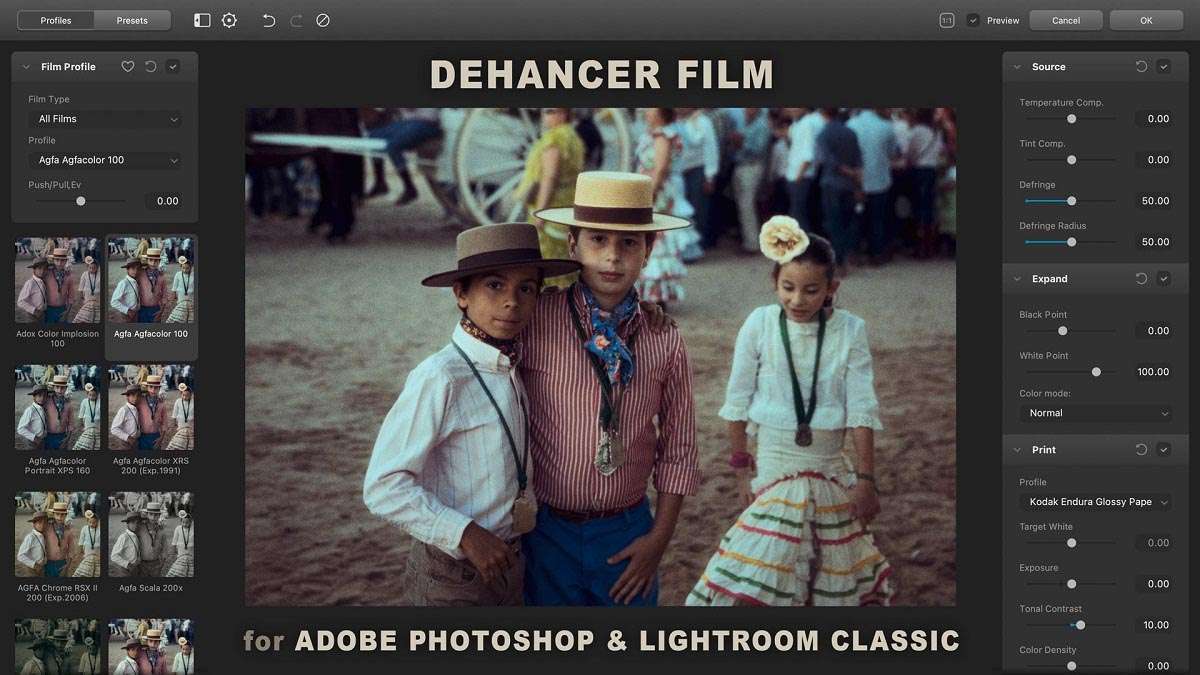
Download Dehancer Film 2.7.3 for Photoshop & Lightroom – Advanced Analog Film Emulation Plugin
Dehancer Film 2.7.3 is an advanced analog film emulation plugin specifically designed for Adobe Photoshop and Lightroom Classic. Developed by Dehancer, a company focused on precise analog film replication, this software caters to photographers, photo editors, and digital artists seeking to achieve authentic photochemical film aesthetics in their digital workflows. It stands out by scientifically modeling the entire analog film process, offering a deeper level of realism than standard filters or LUTs.
An In-Depth Overview of Dehancer Film
Dehancer Film is a sophisticated plugin engineered to bring the distinctive characteristics of analog photochemical film into the digital realm. Its core principle lies in the scientific emulation of film’s complex physical and chemical behaviors. This plugin is indispensable for creative professionals who aim to imbue their digital photography with the unparalleled depth, texture, and color fidelity of traditional film. By integrating seamlessly with industry-standard software like Adobe Photoshop and Lightroom Classic, Dehancer Film supports modern, non-destructive editing workflows.
Comprehensive Film Stock Emulation and Photochemical Accuracy
The plugin offers an extensive library of emulated film stocks, encompassing a wide spectrum of analog media including color negative, slide, black & white, and motion picture films. Dehancer Film meticulously reconstructs the unique spectral sensitivity, color response, and contrast curves inherent to each film type. This scientific accuracy ensures that the digital output maintains the authentic look and feel of specific, iconic film stocks, providing users with unparalleled creative control.
Advanced Grain Modeling and Optical Effects
Dehancer Film distinguishes itself with its scientifically modeled film grain, which replicates the actual micro-structure of photochemical grain rather than employing simple digital noise. Users can adjust grain parameters such as size, roughness, and intensity to achieve the desired authentic texture. The plugin also accurately simulates optical effects like halation, a glow that appears around bright light sources in film, and bloom, which softens highlights. Additionally, it can introduce subtle vintage imperfections such as dust, scratches, gate weave, and film breathing, further enhancing the realism of the analog emulation.
Analog Darkroom Simulation and Color Grading Controls
This plugin features advanced controls that simulate traditional darkroom techniques. The Color Head tool allows for sophisticated color grading in the CMY spectrum, mirroring analogue printing processes. Customizable exposure and development controls mimic the effects of push and pull processing, altering contrast and tonal range. Dehancer Film also provides authentic cross-processing simulation and integrated tools for split toning and other darkroom-inspired analog workflows, offering a comprehensive suite for achieving vintage looks.
Seamless Non-Destructive Workflow Integration
Dehancer Film is optimized for professional, non-destructive editing. Within Photoshop, it functions flawlessly as a Smart Filter when applied to Smart Objects, allowing for full editing, masking, and re-adjustments at any stage of the workflow. For Lightroom Classic users, the plugin integrates via the external editor function, typically working with TIFF or JPEG files. This approach ensures that the plugin’s powerful emulation capabilities are applied without compromising the original RAW dynamic range or editability.
Performance Enhancements and New Features in Version 2.7.3
Version 2.7.3 of Dehancer Film introduces significant performance improvements and new capabilities. It features GPU acceleration via OpenCL and CUDA, drastically reducing rendering times. The film library has been expanded to include popular Kodak Vision3 motion picture stocks, offering new cinematic possibilities. Enhancements have also been made to black & white grain modeling for greater authenticity, alongside verified compatibility with the latest Adobe software, including Photoshop 2024 and Lightroom Classic 13+.
Real-World Use Cases and Industry Applications
Dehancer Film is widely adopted across various photographic genres. Portrait photographers use it to achieve soft, flattering skin tones and classic analog depth. Wedding and fashion photographers often employ its emulations for distinctive color palettes and textures that evoke a timeless aesthetic. Documentary and fine art photographers utilize the plugin to add evocative analog moods and imperfections to their work. Furthermore, its accurate motion picture film emulations are valuable for filmmakers and editors seeking to achieve specific cinematic looks within their digital projects.
Frequently Asked Questions
How does Dehancer Film plugin achieve authentic analog film emulation in Photoshop and Lightroom?
Dehancer Film utilizes scientifically modeled algorithms that precisely replicate the complete photochemical process of analog films. This includes the intricate micro-structure of film grain, specific color responses, the characteristic glow of halation, and subtle vintage imperfections. This rigorous, science-based approach allows the plugin to render digital images with the rich textures, nuanced tones, and authentic feel synonymous with the original film stocks.
Which film stocks are available in Dehancer Film 2.7.3, and can I simulate motion picture film looks?
The Dehancer Film 2.7.3 library features emulations of numerous film stocks, including popular choices like Kodak Portra, Fuji Pro, Ilford HP5, Kodak Tri-X, and Fuji Velvia. Notably, it now includes new additions such as Kodak Vision3 250D and 500T motion picture stocks. This comprehensive selection enables users to accurately replicate a broad range of photographic and cinematic film aesthetics within their digital editing projects.
Can I use Dehancer Film non-destructively with Photoshop and Lightroom?
Yes, Dehancer Film is designed for non-destructive editing. In Photoshop, it integrates seamlessly as a Smart Filter when applied to Smart Objects, allowing for unlimited adjustments, masking, and re-editing without altering the original image pixels. Within Lightroom Classic, it functions through the external editing workflow, typically on TIFF or JPEG files, thereby maintaining a flexible and non-destructive process compatible with professional photography standards.





Reviews
There are no reviews yet.