
Download ECam PRO 5.0.432 – Efficient CNC G-Code Programming and CAD-CAM Integration
ECam PRO 5.0.432 is a specialized manufacturing software designed for efficient CNC programming, integrating CAD, CAM, and conversational programming capabilities. Developed for the mechanical manufacturing sector, it assists professionals in programming CNC machine parts, particularly those with simple to moderate geometric complexity. This technical tool streamlines the workflow for producing repeating components, offering a user-friendly approach compared to general-purpose CAD/CAM solutions.
Overview of ECam PRO in Mechanical Manufacturing
ECam PRO operates at the intersection of Computer-Aided Design (CAD) and Computer-Aided Manufacturing (CAM), providing a unified environment for developing CNC machining programs. Its core strength lies in simplifying the programming of mechanical parts, making it a valuable asset for production engineers and machine programmers. The software is particularly beneficial in environments focusing on the efficient production of standardized or simple geometric components, where speed and ease of programming are paramount.
Programming Capabilities and G-Code Customization
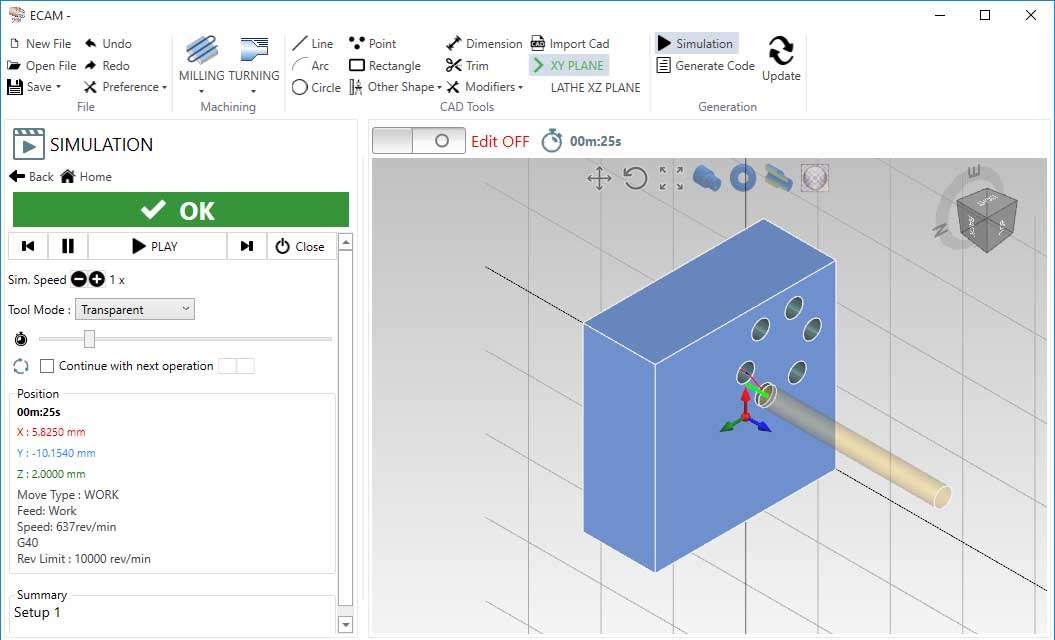
The primary function of ECam PRO is the generation of G-code, the standard programming language for CNC machines. Users can define machining operations, and the software translates these into executable G-code instructions tailored for specific machine controllers. Customization is a key aspect, facilitated by on-board scripting capabilities using C#. This allows for the adaptation of G-code output to meet unique machine requirements or process specifications. ECam PRO also incorporates visualization tools, such as the TIMELINE feature, which provides a graphical representation of the machining process, and uses color-coded commands to enhance readability and understanding of the generated code.
Design Tools and Stock Modeling Features
ECam PRO includes integrated design tools that support the creation and manipulation of part geometry. A significant feature is its 3D stock modeling, allowing users to visualize the workpiece throughout the machining process. Geometric profiles can be defined using parameters, which aids in creating reusable templates for common part features. The software also offers robust support for importing designs from external CAD sources. It is compatible with standard file formats like DXF and DWG, ensuring seamless integration into existing design and manufacturing workflows by allowing direct use of pre-existing CAD data.
Project Management and Documentation Functions
Beyond programming, ECam PRO provides features to manage and document manufacturing projects. The software can generate HTML sheets, which serve as project documentation, detailing specifications, toolpaths, and relevant programming information. This facilitates clear communication and record-keeping within a manufacturing team or for client review. Additionally, a View Cube feature assists in navigating and visualizing the 3D model and machining operations, enhancing project comprehension and review processes before execution on the shop floor.
Comparative Uses and Industry Application Cases
For machining simple, repeating parts, ECam PRO’s combined CAD/CAM and conversational approach offers distinct advantages over more complex, general-purpose CAD/CAM systems. Its targeted feature set leads to faster programming times and potentially fewer errors in these specific applications. Real-world use cases include small to mid-sized manufacturing shops that specialize in producing components like brackets, shafts, gears, or custom fixtures where programming efficiency for repetitive tasks is critical to overall production throughput. The ideal user profile includes CNC programmers, toolmakers, and production engineers who require a streamlined process for straightforward part manufacturing.
Frequently Asked Questions
How does ECam PRO simplify the CNC programming process for simple parts?
ECam PRO integrates conversational programming with traditional CAD/CAM features, allowing users to quickly define simple geometric profiles through parameter input and automate G-code generation, speeding up programming workflows with intuitive visual tools like the TIMELINE and color-coded commands.
Can ECam PRO handle importing CAD designs, and which formats are supported?
Yes, ECam PRO supports importing common CAD file formats such as DXF and DWG, enabling users to leverage existing designs directly within the programming environment for efficient G-code generation and part programming.
What customization options does ECam PRO offer for G-code output?
The software allows extensive customization of G-code output, including scripting capabilities using C# to tailor the code to specific CNC machine requirements, ensuring optimal machine compatibility and process efficiency.






Reviews
There are no reviews yet.