

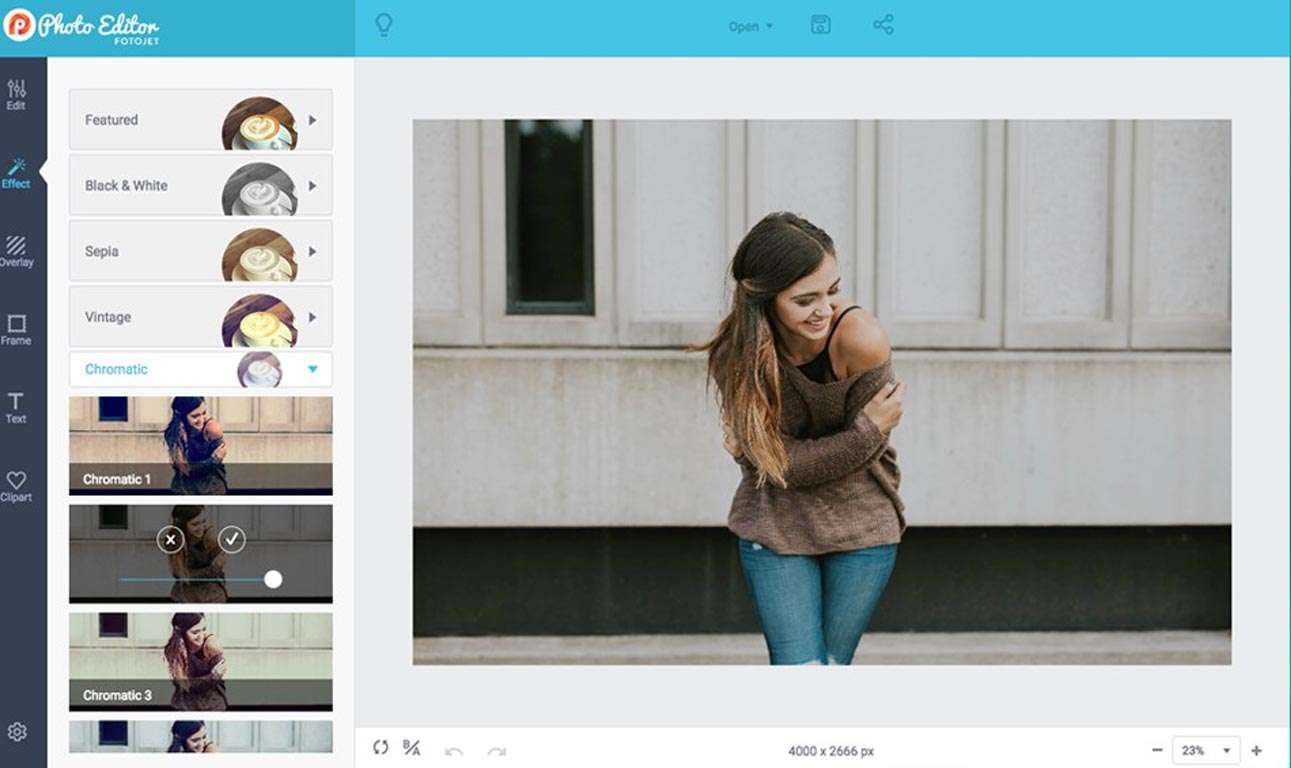
Download FotoJet Photo Editor 1.3.1 – Versatile Photo Editing and Design Software
FotoJet Photo Editor 1.3.1 is a comprehensive desktop application developed by PearlMountain Technology, designed to merge photo editing, graphic design, and collage creation into a single, user-friendly platform. This software caters to a wide audience, including photography enthusiasts, social media managers, bloggers, educators, and small business owners, providing accessible tools for efficient content creation and photo enhancement without the steep learning curve of professional-grade applications.
An Integrated Platform for Photo Editing, Graphic Design, and Collage Creation
FotoJet offers a streamlined workflow by combining three distinct creative functionalities. Users can enhance their photographs with a suite of editing tools, design engaging graphics for various platforms using extensive templates, and create personalized photo collages for personal or professional use, all within one application. This integrated approach is particularly beneficial for those focused on producing quick, visually appealing content for social media, educational materials, or small business marketing efforts.
Powerful Photo Editing Capabilities for Quick Enhancements
Essential Photo Adjustments
The software provides foundational photo editing tools essential for refining images. Users can perform standard operations such as cropping, resizing, and rotating images to achieve desired compositions. Additionally, adjustments for exposure, contrast, saturation, and sharpness allow for precise tweaking of an image’s overall tone and clarity.
Filters, Effects, and AI-Assisted Retouching
FotoJet enables creative expression through a wide array of one-click filters and effects, including vintage styles. For portrait enhancements, features such as red-eye removal, blemish fixes, and teeth whitening are available. The 1.3.1 update specifically highlights optimized AI background removal, simplifying the process of isolating subjects from their original backgrounds.
Creative Collage Design with Flexible Templates and Customization
Pre-designed Templates for Various Occasions
To facilitate quick collage creation, FotoJet offers hundreds of pre-designed templates. These layouts are suitable for a diverse range of themes, including family events, holiday celebrations, and social media announcements, providing users with a starting point for their personalized designs.
Custom Grid Design and Background Options
Beyond the standard templates, users have the flexibility to design custom collage grids, allowing for unique arrangements of photos. The software also supports extensive background customization, enabling users to apply solid colors, patterns, or even personal images as backgrounds to further tailor their collages.
Graphic Design Made Accessible for Social Media and Marketing
Extensive Template Library for Fast Projects
The graphic design module is bolstered by a vast library of templates optimized for common digital formats. This includes designs tailored for social media posts, eye-catching YouTube thumbnails, professional-looking flyers, and marketing banners, significantly speeding up the creation process for timely content.
Drag-and-Drop Interface with Rich Design Elements
FotoJet’s graphic design functionality relies on an intuitive drag-and-drop interface, making it accessible even for users with no prior design experience. Users can enhance their designs with a rich collection of elements, including stock photos, a diverse selection of fonts, vector graphics, and background assets.
Latest Enhancements in Version 1.3.1
The 1.3.1 update for FotoJet Photo Editor introduces several key improvements aimed at enhancing user productivity and creative options. This includes the addition of new social media template packs, refined AI background removal technology for more precise edge detection, and an expanded font library featuring over 200 new typefaces. Performance optimizations have also been implemented to ensure faster loading times for templates and a smoother overall user experience, complemented by minor user interface refinements.
Practical Applications and User Scenarios
FotoJet Photo Editor serves a variety of practical needs across different user groups. Social media managers can rapidly generate engaging content, while bloggers can create visually appealing graphics for their posts and websites. Educators can design instructional materials, and small business owners can produce marketing assets like flyers and social media ads. Photography hobbyists also benefit from the easy-to-use editing and collage tools for personal projects.
Frequently Asked Questions
What new features are included in FotoJet Photo Editor version 1.3.1?
Version 1.3.1 introduces over 500 new social media templates, enhanced AI background removal with improved edge refinement, an expanded font library with 200+ new fonts, performance optimizations for faster template loading, and minor user interface improvements.
Can FotoJet Photo Editor be used offline for photo editing and design?
Yes, FotoJet Photo Editor is a desktop application designed to provide photo editing, collage making, and graphic design capabilities without requiring an internet connection, making it suitable for offline use.
Who is the ideal user for FotoJet Photo Editor?
The software is ideal for social media managers, bloggers, small business owners, educators, and photography enthusiasts who need quick, easy-to-use tools for photo editing, graphic creation, and collage making without complex professional software.





Reviews
There are no reviews yet.