

Download Frame0 v1.5.0 – Hand-Drawn, AI-Enhanced UI Wireframing
Frame0 v1.5.0 is a professional UI prototyping and wireframing application designed to accelerate the early stages of digital product development. It caters to UI/UX designers, web and mobile application developers, product managers, and those involved in design education, enabling rapid visualization of application structure and information architecture. Frame0 distinguishes itself by offering an intentionally hand-drawn aesthetic, encouraging a focus on core functionality before visual polish, complemented by an AI Agent to streamline the design process.
Embracing the Sketch-Style Wireframe
Hand-Drawn Components for Concept-First Design
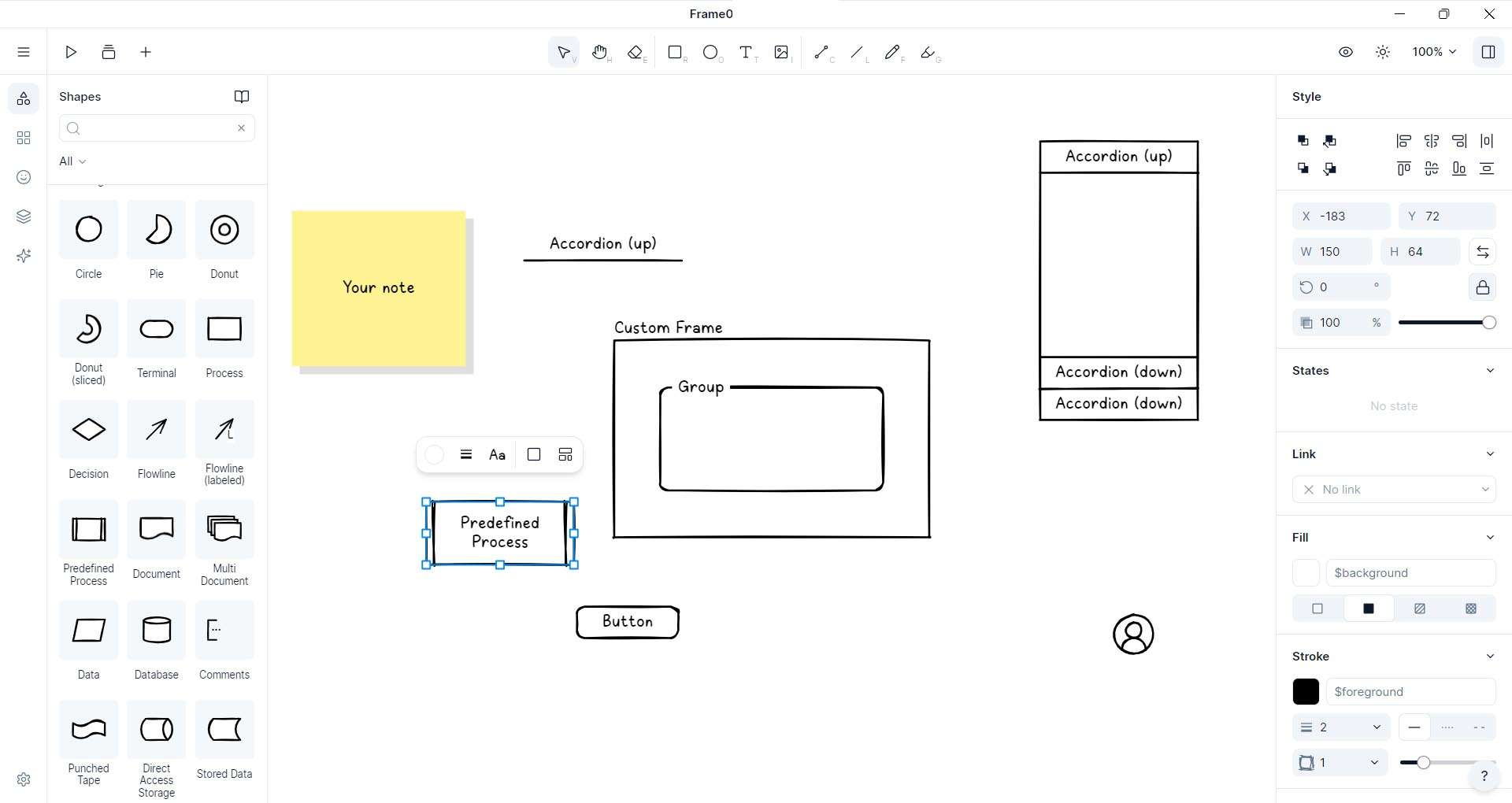
Frame0 utilizes intentionally imperfect lines and shapes to mimic hand-drawn sketches. This design choice is crucial for early-stage ideation, helping stakeholders concentrate on the structural integrity and information architecture of an interface rather than getting sidetracked by aesthetic details. This approach ensures that discussions remain focused on usability and core functionality during concept development.
Balancing Roughness and Readability
While embracing a sketch-like appearance, Frame0 provides adjustable sketch intensity controls. This feature allows designers to fine-tune the visual “roughness” of components, ensuring that wireframes remain clear and readable for effective communication. Maintaining a balance between a hand-drawn feel and professional clarity facilitates better understanding and feedback during usability testing sessions.
AI Agent: Accelerating Your Wireframe Workflow
Intent-Driven Component Suggestions
The integrated AI Agent in Frame0 is designed to interpret user intent based on the drawing context. As designers sketch or place elements, the AI proactively suggests relevant UI components, common interface patterns, and layout structures. This feature aims to reduce repetitive tasks associated with building standard interface elements, allowing designers to explore concepts more rapidly.
Smart Layout Recommendations
Frame0’s AI Agent also provides automated layout refinements. By analyzing existing elements and adhering to established best practices in UI design, it can suggest optimized spacing, alignment, and arrangement of components. This accelerates the process of creating aesthetically balanced and functional screens, ensuring a consistent layout grid across the prototype.
Extensive Hand-Drawn Component Library
Pre-Built UI Elements and Patterns
The software includes a comprehensive library of pre-built components designed with the characteristic hand-drawn aesthetic. This library features a wide array of buttons, form elements, navigation bars, icons, and common interface patterns essential for rapid prototyping. Designers can quickly assemble functional screens by dragging and dropping these elements.
Custom Components and Team Sharing
Beyond the pre-built options, Frame0 enables users to create their own custom UI components. These bespoke elements can be saved and organized into personal or team libraries, ensuring consistency across multiple projects. This capability is particularly beneficial for design teams working on projects with specific design system requirements.
Seamless Workflow Integration
Flexible Export and Presentation Options
Frame0 supports various export formats, including PNG, SVG, and PDF, allowing designers to share wireframes easily. These exports are suitable for embedding in presentations, design documents, or for use in formal stakeholder feedback sessions. The ability to export in different formats ensures compatibility with various downstream workflows.
Collaborative Feedback and Versioning
The platform incorporates tools for enhanced team collaboration. Features such as real-time commenting, annotation capabilities, and a comprehensive version history allow multiple team members to review and provide feedback on wireframes concurrently. Shared project workspaces facilitate seamless iteration and communication among cross-functional teams.
Cross-Platform Accessibility
Native Desktop Experiences
Frame0 offers dedicated native applications for Windows, macOS, and Linux operating systems. These desktop applications provide a robust and stable environment for wireframing, supporting full offline functionality for uninterrupted work sessions.
Web-Based Sketching Anywhere
In addition to desktop applications, Frame0 provides a web-based interface accessible through any modern browser. This allows users to start sketching and prototyping without installation, offering flexibility for quick edits or collaborative sessions from any device. Synchronization between desktop and web versions ensures your work is always up-to-date.
What’s New in Frame0 v1.5.0
This latest release, Frame0 v1.5.0, introduces significant enhancements focused on workflow efficiency and user experience. Key updates include the full integration of the AI Agent for intelligent component suggestions and smart layout recommendations, expanding the pre-built component library further, and refining the sketch rendering engine for improved visual fidelity. Performance boosts have been implemented across the application, alongside user interface refinements for a more intuitive experience. New export formats have been added, and collaboration tools have been enhanced to support real-time feedback and team sharing more effectively.
Frequently Asked Questions
How does the AI Agent in Frame0 improve my wireframing process?
The AI Agent analyzes your sketch context and suggests relevant UI components, layouts, and patterns—automating repetitive tasks and speeding up concept exploration while preserving full creative control. This allows designers to focus more on the strategic aspects of information architecture and user flow.
What export formats does Frame0 support for sharing wireframes?
Frame0 lets you export your sketches as high-resolution PNG, SVG, or PDF files, and you can copy to the clipboard for quick pasting into presentations or documentation. This ensures your wireframes can be easily integrated into various stages of the product development lifecycle.
Can multiple team members collaborate on the same Frame0 wireframe in real time?
Yes—Frame0 offers real-time collaboration with comment threads, version history, and shared project workspaces, so teams can review, annotate, and iterate together seamlessly. This feature is crucial for efficient teamwork, especially in remote or distributed environments.





Reviews
There are no reviews yet.