

Download FX Draw Tools MultiDocs 26.1 – Innovative Software for Mathematical Diagrams
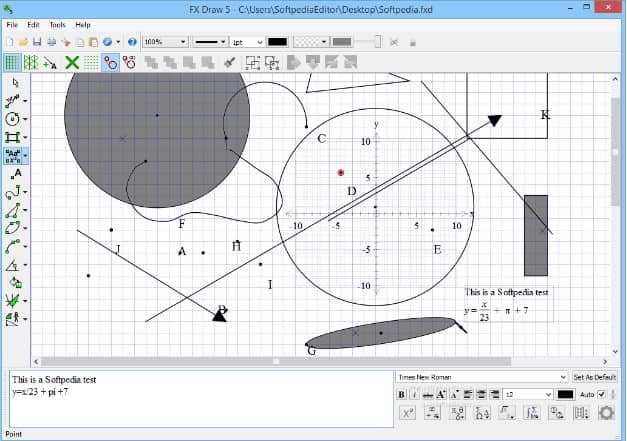
FX Draw Tools MultiDocs 26.1 is an educational software application specifically designed for drawing mathematical diagrams. It caters to educators and students in the mathematics field, aiming to simplify the creation and visualization of complex math concepts. The software provides a specialized set of tools to enhance the teaching and learning experience in mathematics classrooms.
Overview of FX Draw Tools MultiDocs
Purpose and Target Audience
The primary purpose of FX Draw Tools MultiDocs 26.1 is to assist educators in creating clear and accurate mathematical diagrams for instructional use. Its target audience includes math teachers, professors, and students who require a tool to visualize geometric shapes, graphs, equations, and other mathematical elements. The software aims to make complex math concepts more accessible and understandable through effective visual aids.
Key Features and Capabilities
Drawing Tools and Predefined Diagrams
FX Draw Tools MultiDocs 26.1 offers a comprehensive suite of drawing tools to facilitate the creation of mathematical illustrations. Users can generate various geometric shapes, angles, curves, and Venn diagrams with precision. A significant feature is the extensive library containing over 300 predefined diagrams, which serve as ready-to-use templates for common mathematical representations, significantly reducing preparation time for educators.
Interactive Whiteboard Support
This educational software is engineered to integrate seamlessly with interactive whiteboards, a crucial component in contemporary classroom technology. FX Draw Tools MultiDocs enables teachers to draw, manipulate, and present mathematical diagrams directly on an interactive display. This capability supports dynamic lesson delivery, allowing for real-time annotation and student participation, thereby fostering a more engaging and interactive learning environment.
Applications in Education
The practical applications of FX Draw Tools MultiDocs 26.1 are extensive within mathematics education. It is particularly useful for live classroom demonstrations where teachers can construct diagrams step-by-step to explain mathematical principles. This visual approach aids students in developing a deeper comprehension of subjects ranging from basic geometry to advanced calculus, reinforcing theoretical knowledge with practical visual examples.
User Experience and Environment
FX Draw Tools MultiDocs 26.1 is characterized by its user-friendly interface, designed to be intuitive and easy to navigate. The software prioritizes ease of use, ensuring that users, particularly educators who may not have extensive technical backgrounds, can create sophisticated diagrams without a steep learning curve. This focus on a simplified user environment allows for efficient use during lesson planning and delivery.
Output Options and Sharing Capabilities
The software provides versatile output options, enabling users to export their created diagrams in various formats suitable for different educational contexts. Results can be shared as slides for presentations, integrated into web documents, or saved in formats compatible with other applications. This flexibility ensures that mathematical visuals created with FX Draw Tools MultiDocs can be easily distributed and utilized across multiple platforms.
Frequently Asked Questions
What types of diagrams can I create with FX Draw Tools MultiDocs?
FX Draw Tools MultiDocs 26.1 allows users to create a wide range of mathematical and geometric diagrams, including angles, curves, Venn diagrams, and graphs. Additionally, the software features a library of over 300 predefined diagram templates that can be easily customized for specific lesson requirements.
How does FX Draw integrate with interactive whiteboards?
FX Draw Tools MultiDocs 26.1 is designed to work seamlessly with interactive whiteboards, permitting educators to draw, annotate, and present mathematical figures directly on the board. This interactive capability enhances dynamic lesson delivery and encourages greater student engagement during mathematics instruction.
What is the benefit of using predefined diagrams in FX Draw?
The utilization of over 300 predefined diagrams in FX Draw Tools MultiDocs offers significant time-saving benefits for educators. These ready-made templates can be quickly incorporated into lesson plans and presentations, allowing teachers to concentrate more on pedagogical content and less on the technical aspects of diagram preparation.






Reviews
There are no reviews yet.