

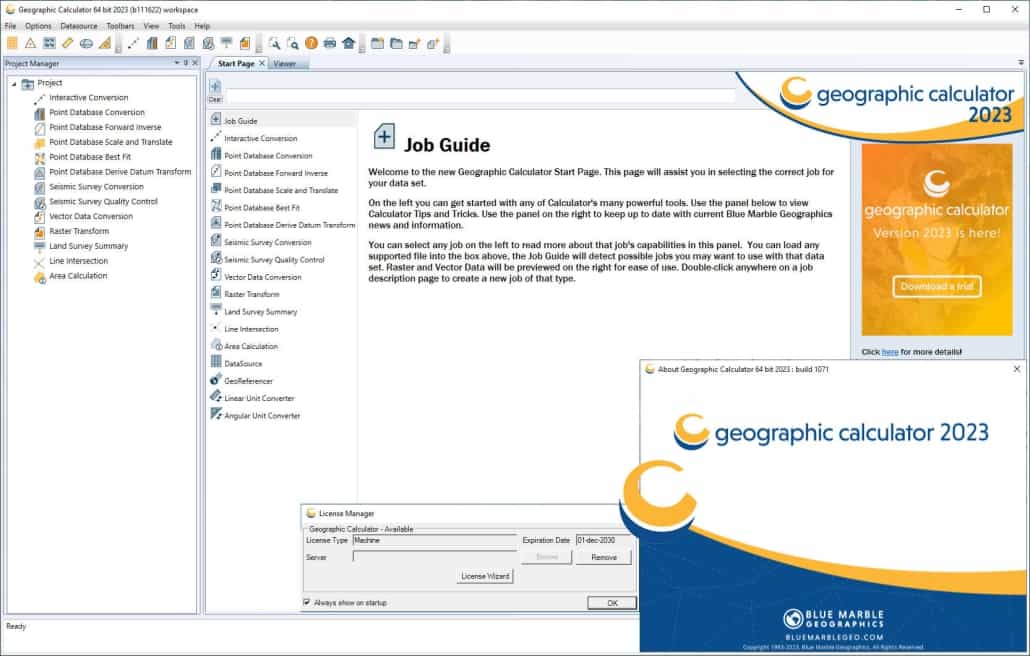
Download Geographic Calculator 2025 – Advanced Geospatial Transformation Tool
Geographic Calculator 2025, developed by Blue Marble Geographics, is a leading geospatial software application designed for precise coordinate transformation and data conversion. This tool is essential for professionals in geodesy, Geographic Information Systems (GIS), and environmental science who require accurate manipulation of spatial data across various formats and coordinate systems. Its origins trace back to 1992, establishing a long history of reliable geodetic support.
Overview of Geographic Calculator 2025
Historical Development and Evolution
First released by Blue Marble Geographics in 1992, the Geographic Calculator has undergone continuous development to become a comprehensive geospatial data transformation solution. The software has evolved significantly, integrating features from other Blue Marble products and enhancing its capabilities. The 2025 version represents the latest in this lineage, benefiting from decades of refinement and user-driven improvements in handling complex coordinate transformations.
Key developmental milestones include the expansion of its coordinate system library and the incorporation of collaborative workspace tools. This iterative process ensures the software remains relevant and powerful for an ever-changing geospatial landscape.
Key Uses and Applications in Geospatial Sciences
The Geographic Calculator is a critical tool for professionals engaged in a variety of geospatial tasks. Its primary applications span several fields:
- Geodesy: Facilitating complex geodetic calculations and transformations between different datums and projections.
- GIS Professionals: Enabling accurate data integration and conversion for mapping, analysis, and management of geographic information.
- Surveying: Ensuring precision in transforming survey data from field measurements to project-specific coordinate systems.
- Environmental Science: Supporting research and analysis by accurately transforming environmental datasets for comparative studies and impact assessments.
- Urban Planning: Assisting in the transformation of data for municipal planning and infrastructure development projects.
Core Functionalities and Features
Interactive Calculations and Database Integration
Geographic Calculator 2025 offers robust tools for performing direct coordinate conversions between different systems. Users can input specific coordinates and instantly see their transformed values, leveraging an extensive, built-in library of coordinate systems and transformations. The software also supports integration with spatial databases, allowing for seamless data management and retrieval.
This interactive capability is complemented by advanced database management features, enabling users to organize, query, and manage complex geodetic information efficiently.
Advanced Geodetic Manipulations
Beyond standard transformations, the software provides sophisticated features for defining and manipulating geodetic datums and coordinate systems. This includes the ability to create custom transformations, manage geodetic definitions, and perform complex georeferencing operations. These advanced tools are crucial for users working with highly specific or legacy geodetic frameworks.
The georeferencing tools allow users to accurately align raster and vector data to real-world coordinates, which is fundamental for integrating diverse datasets within a common spatial context.
Batch Processing and Data Management
Geographic Calculator 2025 excels in handling large volumes of geospatial data through its powerful batch processing capabilities. Users can set up complex transformation workflows and apply them to numerous files simultaneously, significantly reducing processing time and manual effort. This batch processing is invaluable for large-scale projects common in environmental research and GIS data management.
Administrative tools further enhance the user experience by providing capabilities for managing user accounts, defining access permissions, and maintaining project integrity within a multi-user environment.
Geospatial Data Transformation Capabilities
Supported Formats and File Compatibility
A key strength of Geographic Calculator 2025 is its extensive support for a wide array of geospatial file formats. This broad compatibility ensures that users can accurately transform data regardless of its origin or format, facilitating seamless integration between different software systems and data sources. Supported formats typically include:
- Vector formats (e.g., Shapefiles, GeoJSON)
- Raster formats (e.g., GeoTIFF, ERDAS IMAGINE)
- Point cloud data (e.g., LAS, LAZ)
- CAD files
- Database formats
This comprehensive file support streamlines workflows by minimizing the need for intermediate conversion steps.
Seismic Survey Conversions and Quality Control
The software offers specialized tools for working with seismic survey data, a critical requirement in the oil and gas industry and geophysical research. Geographic Calculator 2025 supports the conversion of seismic data between various formats and coordinate systems commonly used in the industry. Furthermore, it includes quality control features that help ensure the accuracy and integrity of transformed seismic datasets, which is vital for reliable subsurface analysis.
Collaboration and Project Management Features
Workspace and Project Management Tools
Version updates to Geographic Calculator have expanded its collaborative features, particularly through its workspace management tools. These features allow users to create, save, and share project workspaces with team members. This facilitates coordinated efforts in complex geospatial projects, enabling teams to work together efficiently regardless of their physical location.
By centralizing project components and transformations within shareable workspaces, the software promotes consistency and reduces the likelihood of errors in team-based data processing.
Visualization Tools and Data Viewer
Geographic Calculator 2025 includes an integrated multi-data viewer that allows users to visualize transformed data directly within the application. This feature enables side-by-side comparison of original and transformed datasets, aiding in quality control and verification processes. The ability to view various data types, including vector, raster, and points, within a single interface enhances the user’s understanding of the transformation results.
Comparison with Similar Tools
Compared to other geospatial software, Geographic Calculator 2025 distinguishes itself through its exceptionally broad support for coordinate systems and file formats, offering a degree of conversion versatility that is often unmatched. While many GIS platforms offer coordinate transformation capabilities, Geographic Calculator is specifically engineered for this task, providing deeper functionality and more precise control over geodetic operations. Its integrated collaboration tools, allowing for shared workspaces, further enhance its utility in team-based environments, setting it apart from tools that may focus primarily on individual analysis.
Case Studies and Real-World Applications
Blue Marble Geographics’ software has been integral to numerous projects across various sectors. For instance, environmental consulting firms utilize Geographic Calculator to transform diverse datasets for environmental impact assessments and contamination mapping, ensuring all data aligns to a common coordinate reference system for accurate analysis. In large-scale infrastructure projects, surveyors and engineers rely on the software for precise coordinate conversions, verifying the accuracy of spatial data from initial site surveys through construction phases.
Additionally, research institutions in geodesy and earth sciences employ its advanced capabilities to manage and transform historical and contemporary geodetic data, contributing to a better understanding of the Earth’s changing shape and reference frames.
Frequently Asked Questions
What types of geospatial data can I transform using Geographic Calculator 2025?
Geographic Calculator 2025 supports a wide range of geospatial data formats, including vector, raster, and point cloud data. It excels in transforming coordinates across various coordinate systems, making it suitable for applications in surveys and geodesy. This breadth of compatibility ensures that most project data can be managed within the software.
How does the Geographic Calculator handle batch data processing?
Geographic Calculator 2025 allows users to efficiently process multiple datasets in batch mode, thereby saving time for large projects. Users can execute conversions and manipulations across numerous files simultaneously, defining custom workflows for repeatable tasks, which is especially useful for large-scale data harmonization.
Can I collaborate with other users on projects in Geographic Calculator 2025?
Yes, Geographic Calculator 2025 includes enhanced collaboration tools that enable users to share workspaces and projects with team members, facilitating joint efforts regardless of location. This feature promotes teamwork and ensures consistency across project components managed by different individuals.








Reviews
There are no reviews yet.