

Download iMobie DroidKit 2.3.7 – All-in-One Android Device Management & Recovery Solution
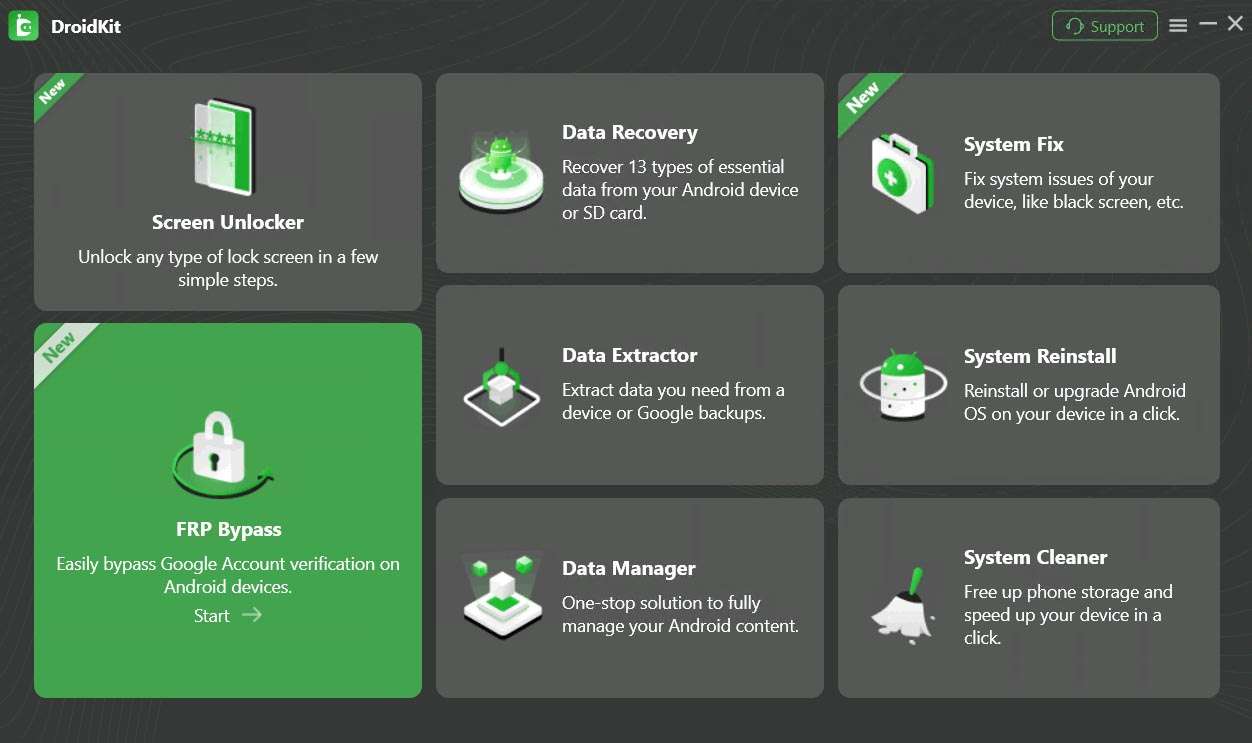
iMobie DroidKit 2.3.7 is a comprehensive Android device management and recovery utility developed by iMobie Inc. This all-in-one toolkit is designed for IT support professionals, consumer electronics repair technicians, and device refurbishment specialists. It offers a suite of eight integrated tools focused on data recovery, system repair, screen unlocking, and FRP bypass, emphasizing a no-root, no-technical-skill approach for enhanced user accessibility.
Streamlined Android Device Management
DroidKit provides a robust platform for managing Android device content and optimizing performance, streamlining common maintenance tasks for technicians and end-users alike.
Comprehensive File & Data Manager
This module facilitates intuitive drag-and-drop management of photos, videos, contacts, and other media. It supports selective backup of device data to a computer and enables precise restoration of backed-up files, ensuring critical information is preserved.
System Cleaner and Performance Optimizer
DroidKit aids in enhancing device performance by clearing unnecessary cache files, identifying and managing background applications consuming resources, and providing detailed storage analysis to free up valuable space.
Advanced Data Recovery Methods
Addressing various data loss scenarios, DroidKit employs multiple recovery techniques to retrieve deleted or lost files, from common accidental deletions to more severe data corruption.
Quick Recovery for Common Data Loss
This feature offers a one-click scanning process to recover frequently lost data types, including photos, text messages (SMS), and WhatsApp chat history, directly from the device’s internal storage.
Deep Recovery for Deleted or Overwritten Files
For more complex situations, the Deep Recovery function performs a sector-level scan. This advanced technique aims to retrieve deleted or overwritten files by analyzing storage media directly, incorporating iMobie’s NO-DATA-LOSS technology to safeguard existing data.
SD Card & Google Backup Extraction
DroidKit supports recovery from formatted SD cards, retrieving lost files and data. Additionally, it allows for selective extraction and restoration of data directly from Google account backups without requiring a full device restore.
Effortless System Repair & Maintenance
DroidKit tackles device malfunctions by offering solutions for system crashes and enabling straightforward OS updates or reinstalls.
System Fix for Crashed or Unresponsive Devices
The software addresses common system failures, including resolving boot loops, diagnosing and fixing issues with black or frozen screens, and restoring device functionality after software glitches.
One-Click System Reinstall & OS Upgrade
Users can reinstall the device’s operating system with a single click. This process automatically matches the correct firmware and performs a safe, non-root reinstallation of the stock Android OS.
Secure Screen Unlock & FRP Bypass
DroidKit offers solutions for bypassing device locks, including screen lock PINs and Google’s Factory Reset Protection (FRP) mechanism.
Universal Screen Unlocker
This utility removes various types of screen locks, such as PINs, patterns, passwords, and biometric authentications like fingerprint and face recognition, when a device is inaccessible.
Factory Reset Protection Solutions
DroidKit provides workflows to bypass the FRP lock on numerous Android devices. This includes support for popular manufacturers like Samsung, Google Pixel, LG, and Motorola, facilitating access to devices that have undergone a factory reset.
Compatibility Matrix & Supported Devices
DroidKit ensures broad usability across a wide range of Android devices and versions, alongside support for numerous file types and data formats.
Android Versions & OEM Support
The software is designed to work with Android versions from 4.x up to 13. It offers compatibility with major mobile brands including Samsung, Google Pixel, LG, Motorola, and a wide array of other manufacturers and models.
Supported File Formats & Data Types
DroidKit can recover and manage a comprehensive list of data types, including photos, videos, audio files, documents, application data, contacts, call logs, and messages.
Real-World Use Cases & Success Stories
Professionals in device repair and IT support leverage DroidKit to resolve complex customer issues efficiently. For instance, technicians frequently use the screen unlocker to remove forgotten PINs on Samsung Galaxy devices, enabling users to regain access. In another scenario, data recovery specialists utilize Deep Recovery to extract critical files from Pixel devices with damaged screens. Furthermore, DroidKit simplifies the process of reinstalling the correct stock ROM on LG phones that have encountered issues following unsuccessful Over-The-Air (OTA) updates.
Navigating the DroidKit Interface
User Workflow Overview
The DroidKit interface is structured to guide users through a logical sequence from initiating the software to completing a recovery or repair task. Upon launching DroidKit, users are presented with the main dashboard, which lists the eight integrated modules. Selecting a module, such as “Data Recovery” or “System Fix,” presents specific options aligned with the task. The workflow typically involves connecting the Android device, following on-screen prompts for necessary permissions or modes, and then executing the chosen function, such as initiating a scan or a system repair. Each step is designed for clarity, minimizing the need for prior technical expertise.
Frequently Asked Questions
Can iMobie DroidKit bypass the Google FRP lock on my Android device?
Yes. DroidKit’s FRP Bypass utility removes Factory Reset Protection locks on most Samsung, Google Pixel, LG, and Motorola devices without requiring root access or advanced technical skills. This feature is particularly useful for users acquiring second-hand devices or those who have forgotten their Google account credentials after a factory reset.
Does DroidKit require root access to recover deleted data?
No. Both Quick and Deep Recovery modules operate without rooting the device, preserving warranty and security while scanning internal storage and SD cards for recoverable files. This approach ensures that users can attempt data recovery without the risks associated with voiding device warranties or compromising system integrity.
Which Android versions and device models does DroidKit support?
DroidKit supports Android versions from 4.x through Android 13 and is compatible with leading manufacturers such as Samsung, Google Pixel, LG, Motorola, and most other brands. Specific model support is regularly updated within the application to ensure the broadest possible compatibility for users.






Reviews
There are no reviews yet.