

Download Lansweeper – IT Asset Management and Network Scanning Software
Lansweeper is a robust IT asset management and network scanning solution developed by Lansweeper. It is designed to provide comprehensive visibility and control over an organization’s IT infrastructure, serving a critical role in the Information Technology sector. This software assists professionals in effectively managing, securing, and optimizing their networked devices and assets.
Introduction to Lansweeper
Overview and Purpose
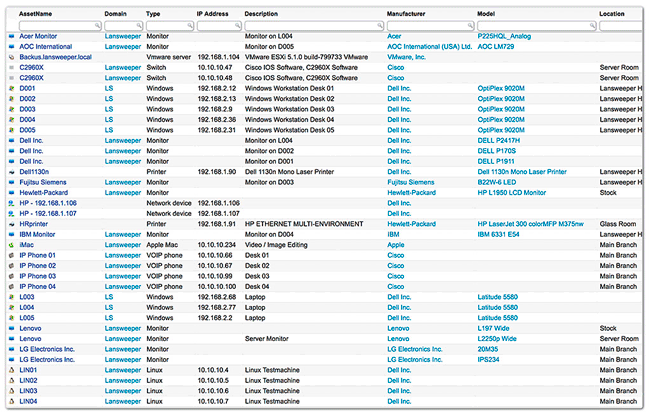
Lansweeper provides an all-in-one IT asset management solution that discovers and inventories all networked devices, servers, and applications within an IT environment. Its primary purpose is to offer IT professionals a unified platform for detailed asset tracking and management, helping organizations maintain an accurate overview of their technology landscape.
Key Capabilities of Lansweeper
Comprehensive Device Scanning
Lansweeper excels in its advanced device scanning capabilities. It can discover and scan a wide array of networked devices, irrespective of their operating systems. This includes seamless scanning across Windows, Linux, and Mac ecosystems, ensuring thorough inventory coverage.
- Scans Windows, Linux, and Mac endpoints without requiring agent installation on each device.
- Identifies virtually all network-connected devices, including servers, routers, switches, and IoT devices.
- Utilizes multiple network protocols for deep and efficient discovery.
Asset Management Features
Beyond discovery, Lansweeper offers robust features for managing hardware and software assets. This functionality helps IT departments maintain detailed records, track software licenses, and monitor hardware configurations across the entire network.
- Automated inventory of hardware assets, including detailed specifications.
- Software inventory to track installed applications and manage license compliance.
- User and login information associated with devices.
- Configuration details and network information for each asset.
Custom Reporting Tools
The software provides powerful and customizable reporting tools, enabling users to visualize and analyze their IT assets effectively. Its reliance on an SQL database allows for highly specific data extraction and tailored reports.
- A user-friendly interface presents data through visual dashboards and reports.
- Leverages an underlying SQL database (SQL Compact or SQL Server) for flexible data querying.
- Allows creation of custom reports to meet unique organizational needs.
- Features include software distribution capabilities for deploying applications remotely.
Integration and Compatibility
Lansweeper is designed for flexible integration within existing IT infrastructures. Its compatibility with standard database systems and its agentless scanning approach simplify deployment and maintenance.
- Supports data storage in either SQL Compact or SQL Server for varying scales of deployment.
- Agentless network scanning reduces overhead and simplifies management.
- Compatibility with a wide range of network environments and configurations.
Real-World Applications
Lansweeper is widely adopted by IT departments in mid to large enterprises. Its capabilities are essential for streamlining IT operations, enhancing security posture, and ensuring regulatory compliance.
- IT asset tracking and inventory management in corporate environments.
- Software license compliance auditing to avoid penalties.
- Network health monitoring and troubleshooting.
- Security audits and vulnerability assessment by identifying all connected endpoints.
Version Updates and Improvements
Continuous development ensures Lansweeper remains at the forefront of IT asset management technology. Recent updates, such as Lansweeper 9.1.41.1, often bring enhancements to scanning efficiency, new features, and improved user interface elements.
- Improvements in scanning algorithms for faster and more accurate device discovery.
- Introduction of new features to enhance asset management or reporting capabilities.
- Performance optimizations for handling larger IT infrastructures.
Conclusion
Lansweeper offers a comprehensive and adaptable solution for network scanning and IT asset management, empowering IT professionals with critical insights into their infrastructure. Its powerful scanning across different operating systems and customizable reporting make it an invaluable tool for optimizing IT operations. Download Lansweeper to gain complete control and visibility over your networked assets.
Frequently Asked Questions
What is Lansweeper used for?
Lansweeper is primarily used for managing IT assets by scanning and identifying all networked devices, including those operating on Windows, Linux, and Mac systems. It provides a detailed inventory of hardware and software assets, aiding in efficient IT administration and security.
Can Lansweeper integrate with existing databases?
Yes, Lansweeper can store data in SQL Compact or SQL Server databases, which allows for robust data management and reporting. This flexibility enables integration with other systems that can access or utilize SQL data.
How does Lansweeper perform device scanning?
Lansweeper employs a deep scanning engine that uses a variety of network protocols to identify connected devices, allowing for comprehensive inventory management. Its agentless approach simplifies deployment while covering a broad spectrum of hardware and software components across the network.





Reviews
There are no reviews yet.