

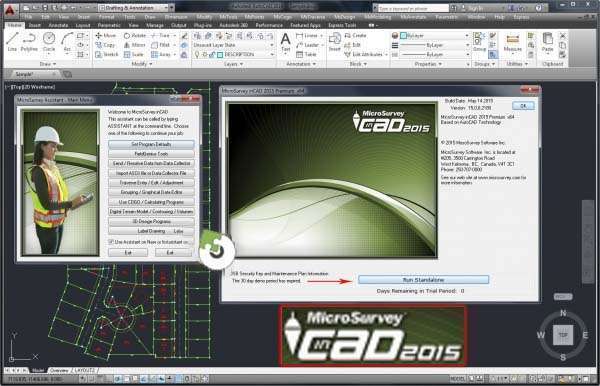
Download MicroSurvey CAD Studio 2024 – Transform AutoCAD into a Surveying Powerhouse
MicroSurvey CAD Studio 2024 is a specialized surveying software solution developed by MicroSurvey Software Inc. It functions as an integrated extension for AutoCAD, enhancing its capabilities to serve professionals in the surveying and civil engineering industries. This software is designed to streamline complex surveying workflows by providing a dedicated set of tools within the familiar AutoCAD environment, making it a powerful asset for precise land measurement and planning.
Overview of MicroSurvey CAD Studio
MicroSurvey CAD Studio is an essential add-on for AutoCAD users in the surveying and civil engineering fields. It transforms the general-purpose CAD platform into a robust environment specifically tailored for land surveying tasks. By integrating advanced surveying functionalities, the software addresses the unique challenges faced by professionals in data collection, computation, and plan creation, ensuring accuracy and efficiency in project execution.
Integration with AutoCAD
A cornerstone of MicroSurvey CAD Studio’s utility is its seamless integration with AutoCAD. This extension leverages the familiar AutoCAD interface and command structure, allowing surveyors to adopt its specialized tools without a steep learning curve. The parallel operation ensures that users can perform complex surveying computations and manipulations directly within their preferred drafting environment, enhancing productivity and reducing the need to switch between different software applications.
Key Functionalities and Tools
MicroSurvey CAD Studio offers a comprehensive suite of specialized tools designed to optimize surveying workflows:
- Coordinate Computation: Enables precise calculation and management of geographical coordinates for survey points.
- Traverse Balancing: Provides advanced algorithms for adjusting and balancing survey traverses to correct for measurement errors.
- Annotation Tools: Offers specialized tools for annotating survey drawings with relevant information, such as stationing, elevations, and property lines.
- Area Calculation: Facilitates accurate computation of land areas from boundary data.
- Point Management: Streamlines the import, export, and management of survey data points.
Applications in Surveying and Civil Engineering
Professionals in surveying and civil engineering utilize MicroSurvey CAD Studio for a variety of critical applications:
- Land Boundary Delineation: Accurately calculating and mapping property boundaries based on field measurements.
- Site Planning and Design: Assisting in the preparation of topographical maps and site plans for construction projects.
- Infrastructure Development: Supporting the design and layout of roads, utilities, and other civil infrastructure.
- Field Data Processing: Efficiently processing raw data collected from surveying instruments in the field.
- Annotation and Documentation: Adding detailed annotations to plans for construction crews, permitting offices, and client reviews.
Industry Recognition and Comparison
MicroSurvey CAD Studio is recognized for its specialized focus on surveying within the broader CAD software market. Unlike general CAD platforms, it offers a curated set of tools purpose-built for land surveying tasks, such as advanced coordinate computation and traverse balancing. Competitors may offer broader functionalities, but MicroSurvey CAD Studio differentiates itself through its deep integration with AutoCAD and its comprehensive, user-friendly surveying toolset tailored specifically for land professionals.
Updates and Version Information
The 2024 release of MicroSurvey CAD Studio continues to enhance its functionality for surveying professionals. While specific new features for this version require detailed release notes, updates typically focus on improving accuracy, expanding the range of supported surveying instruments, and refining existing tools for greater efficiency. MicroSurvey Software Inc. consistently dedicates resources to ensure its offerings remain competitive and aligned with the evolving needs of the surveying and civil engineering sectors.
Frequently Asked Questions
What is MicroSurvey CAD Studio used for?
MicroSurvey CAD Studio is utilized by surveyors and civil engineers as an extension of AutoCAD, providing specialized tools for tasks such as coordinate computation, traverse balancing, and comprehensive annotation of survey plans. It bridges the gap between general CAD capabilities and the specific demands of land surveying fieldwork and data processing.
How does MicroSurvey inCAD enhance AutoCAD’s functionality?
MicroSurvey inCAD enhances AutoCAD by integrating surveying-specific functionalities directly into its interface, making complex surveying tasks more efficient without altering the user experience. This integration allows for seamless execution of tasks like traverse adjustments and coordinate calculations within the familiar AutoCAD environment.
What industries benefit most from using MicroSurvey CAD Studio?
Industries such as civil engineering, construction, and land surveying primarily benefit from MicroSurvey CAD Studio, as it provides tailored features that address their specific needs. This includes professionals who require precise land measurement, boundary definition, and detailed site planning capabilities.






Reviews
There are no reviews yet.