
Download NCH Pixillion Image Converter Plus 12.30 – Versatile Image Conversion Software
NCH Pixillion Image Converter Plus is a versatile graphics application developed by NCH Software, designed for professional and personal graphic design needs. This image converter software is specifically tailored to handle a wide array of image formats, making it an essential tool for individuals and professionals in the digital media and graphic design fields who require efficient image manipulation and conversion capabilities.
Overview and Applications in Graphic Design
NCH Pixillion Image Converter Plus offers a robust solution for managing and converting digital images. Its applications span across various graphic design workflows, from preparing images for web display to organizing digital photo collections. The software is engineered to simplify common image tasks, providing users with a reliable tool for both quick conversions and more detailed image adjustments, ensuring digital assets are optimized for their intended purpose.
Supported Image Formats and Conversion Features
The core strength of NCH Pixillion lies in its extensive support for a wide spectrum of image formats, facilitating seamless conversion between them. This versatility ensures that users can work with virtually any digital photo or graphic file they encounter.
- Common Formats Supported: JPEG, GIF, PNG, BMP, TIFF.
- Document Formats: PDF conversion is also supported, enabling integration with document-based workflows.
- Raw Camera Formats: Support for various digital camera raw formats for professional photographers.
- Web Formats: Optimized conversion to web-friendly formats like JPEG and GIF.
- Preservation of Quality: Conversion processes are designed to maintain image quality and integrity.
User-Friendly Editing and Adjustment Tools
Beyond its conversion capabilities, NCH Pixillion provides practical editing tools that allow users to refine their images before or after conversion. These features contribute to a streamlined workflow by consolidating multiple editing tasks within a single application.
- Image Resizing and Cropping: Tools to adjust dimensions and focus on specific parts of an image.
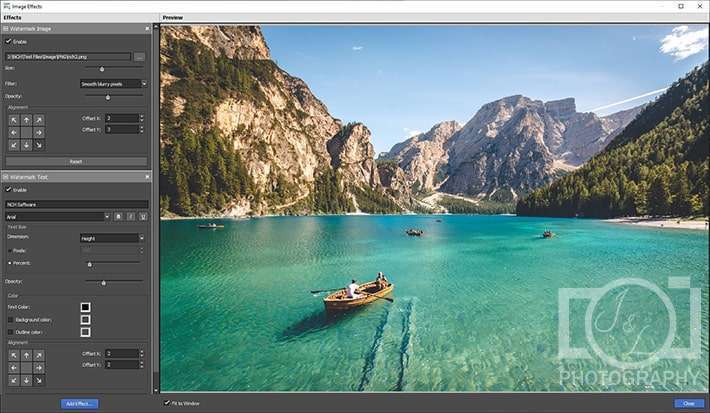
- Watermarking Software: Ability to add custom text or image watermarks to protect intellectual property or apply branding.
- Color Adjustments: Basic controls for brightness, contrast, and saturation to enhance image appearance.
- Filters and Effects: Options to apply simple filters for stylistic enhancements.
Batch Processing for Efficiency
NCH Pixillion’s batch processing capabilities are a key feature for users dealing with large volumes of images, significantly boosting productivity. This function automates repetitive tasks, allowing for simultaneous conversion and editing of multiple files.
- Simultaneous Conversion: Convert an entire folder of images to a different format in one operation.
- Batch Editing: Apply edits such as resizing or watermarking to multiple images concurrently.
- Customizable Output: Define output folders and naming conventions for batch jobs.
- Time-Saving Automation: Ideal for photographers and designers who need to process many images quickly.
Practical Use Cases and Examples
NCH Pixillion Image Converter Plus serves a diverse user base by offering practical solutions for everyday image-related challenges. Its features are beneficial in various professional and personal contexts.
- Graphic Designers: Quickly convert assets from various sources into formats required for print or web projects, apply branding watermarks, and resize images for different platforms.
- Photographers: Convert batches of RAW files to standard formats like JPEG for easier sharing and editing, and apply consistent edits or watermarks to client galleries.
- Web Developers: Optimize images for web use by converting them to efficient formats like JPEG or PNG and resizing them to meet performance requirements.
- General Users: Easily convert personal photos for social media sharing, create digital archives, or prepare images for printing.
- Archiving: Convert older or proprietary image formats into modern, widely supported formats for long-term preservation.
Frequently Asked Questions
What types of image formats can NCH Pixillion convert?
NCH Pixillion supports a wide variety of image formats including JPEG, GIF, PNG, PDF, BMP, and TIFF, allowing users to convert images between these formats efficiently. This broad compatibility ensures that most digital image files can be processed without issue.
Can I add watermarks using NCH Pixillion?
Yes, NCH Pixillion allows users to add text or image watermarks to their converted images during the editing process, enhancing brand visibility and protecting intellectual property. This feature is easily accessible within the software’s editing tools.
Is NCH Pixillion suitable for batch image processing?
Absolutely, NCH Pixillion features robust batch processing capabilities, enabling users to convert and edit multiple image files simultaneously, thus saving time and effort. This makes it an excellent choice for handling large photo collections or design assets.





Reviews
There are no reviews yet.