

PaperCut MF v24 – Enterprise-Grade Print, Copy, and Scan Management Software
PaperCut MF (Multi-Function) is a comprehensive print management solution that enables organizations to track, control, and secure their document workflows across a wide range of devices and platforms. It supports centralized control over printing, scanning, and copying across mixed fleets of printers and MFPs, making it suitable for environments from small businesses to large enterprises with over 500,000 users.
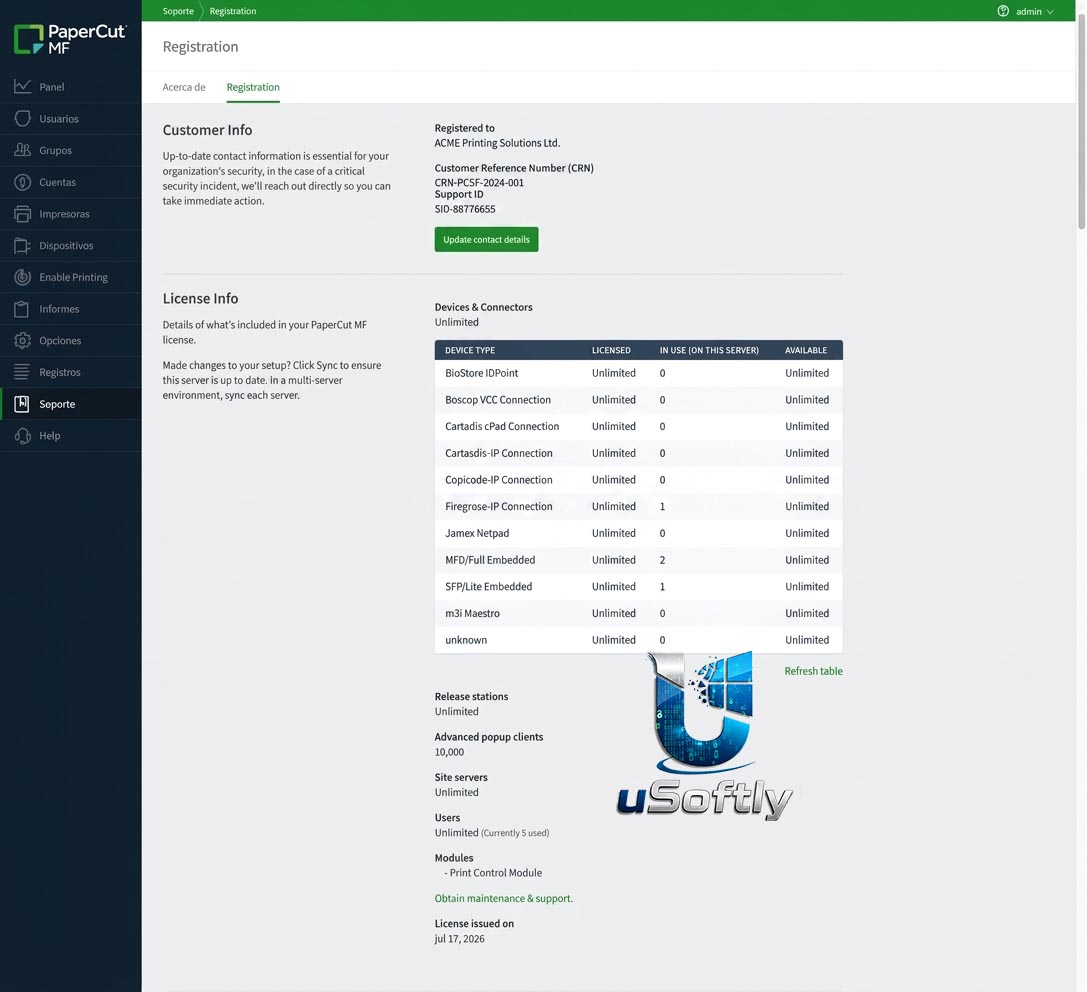
Version 24 introduced a number of significant changes to PaperCut’s licensing model, transforming device licensing from being brand-specific to being brand-neutral in subscription plans. It also lays the foundation for the major feature enhancements that were later delivered in v24.1, particularly around scan management.
Primary Users
PaperCut MF v24 is designed for IT administrators, facility managers, and business owners who need to monitor, control, and optimize their organization’s printing, copying, and scanning infrastructure. It serves professionals who:
-
Manage print fleets across large enterprises, educational institutions, healthcare facilities, and government agencies
-
Seek to reduce print-related costs through quotas, rules, and detailed analytics
-
Ensure document security with user authentication, secure release printing, and audit trails
-
Support sustainability initiatives by tracking and reducing paper and toner waste
-
Implement mobile and BYOD printing without compromising security
Key Features & Capabilities
Core Print Management
-
User Authentication: Supports various methods including card readers, PIN codes, and single sign-on to control access to devices and functions.
-
Print Quotas and Rules: Administrators can set limits and policies on printing to encourage responsible usage and reduce costs.
-
Detailed Reporting and Analytics: Offers comprehensive insights into print activity, costs, and environmental impact through customizable reports.
-
Environmental Dashboard: Visualizes the environmental impact of printing and promotes sustainability initiatives.
Version 24.x Enhancements
Device Management & Licensing
A key change with version 24.0 is the move to a subscription-based licensing model that gives organizations flexibility and brand-neutral device entitlements. For subscription customers, this means:
-
You can swap devices across brands (e.g., replacing a Canon MFD with a Kyocera) without needing to change your subscription.
-
Device entitlements are now grouped by ‘Full embedded’ or ‘Lite embedded’ types, rather than being tied to a specific brand.
-
Perpetual license customers still operate on brand-specific licensing with exchange fees applicable.
Print Deploy Enhancements
Version 24.0.4 introduced admin rights to control access to Print Deploy services.
Integrated Scanning
-
Secure Scan Workflows: Provides customizable scan-to-email, scan-to-folder, and scan-to-cloud workflows directly from MFDs.
-
Scan Archiving and Reporting: Starting from v24.1, PaperCut MF provides visibility into scanning activities by detailing who, what, and where scans are conducted. Reports can be filtered by user, department, or device and scheduled for delivery. Scan Archiving allows for saving, reviewing, and exporting scanned documents alongside metadata for enhanced auditability.
Security and Compliance
-
Windows Protected Print Mode (WPP) Compatibility: Version 24.1 supports Microsoft’s next-generation driverless printing platform, ensuring smooth transitions for modern print workflows.
-
Zero-Install Deployment: Reduces the client footprint on workstations.
-
SSL Encryption: Secures client-server communications with the option to install signed SSL certificates.
Mobility and Flexibility
-
Mobility Print: Enables easy printing from BYOD environments including Chromebooks, iOS, Android, Windows, and macOS.
-
Flexible Deployment: Available as on-premise, hybrid, or cloud-hosted solutions to suit different IT environments.
What’s New in PaperCut MF v24
The v24 release line introduces substantial updates across licensing, device management, and scanning:
Key Enhancements (as of version 24.1)
-
Scan Reporting and Archiving: New tools for scan management provide full visibility into scanning activities, enabling detailed reports and secure archiving of scanned documents.
-
Windows Protected Print Mode (WPP) Support: Ensures compatibility with Microsoft’s modern print protocol.
-
Print Deploy Client Management Interface: Simplifies troubleshooting and introduces granular admin rights for more tailored access control.
Device Count & Licensing (v24.0)
The licensing model has been updated in version 24.0:
-
Subscription Customers: Cannot exceed their device count. When adding a new device, if no entitlement is available, the system displays an error and blocks the addition.
-
Perpetual License Customers: Can still exceed their available device licenses for up to 7 days (grace period) to test a new device.
-
Brand Neutrality: For subscription customers, device entitlements now cover devices of any brand, making fleet management and device swaps much simpler





Reviews
There are no reviews yet.