

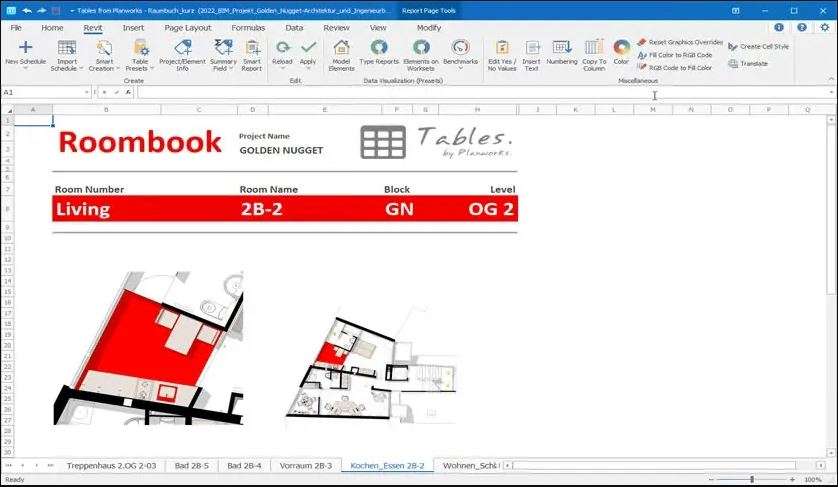
Download Planworks Tables for Revit 2020-2025 – Advanced BIM Table Management Tool
Planworks Tables for Revit is a specialized add-on designed to enhance BIM data management within Autodesk Revit. This tool is engineered for Architecture, Engineering, and Construction (AEC) professionals who utilize Revit for Building Information Modeling and require advanced capabilities for structuring and manipulating complex tabular data. It significantly improves the efficiency of managing surfaces, rooms, sheets, and project documentation by integrating powerful table functionality directly into the Revit environment.
Overview of Planworks Tables for Revit
As an integrated tool for the Autodesk Revit platform, Planworks Tables focuses on optimizing the way BIM professionals handle tabular information. While Revit provides foundational BIM capabilities, Planworks Tables extends these by offering specialized features for creating, editing, and managing intricate data tables. This addresses a key area of workflow enhancement for users who depend on detailed data organization for project success, providing a more robust solution for data-driven design and documentation within the AEC industries.
Enhancing Revit Project Workflows with Table Functionality
Creating and Formatting Data Tables
Planworks Tables introduces advanced functionalities for generating and customizing data tables within Revit projects. Users can create tables that precisely match project documentation requirements, benefiting from a more intuitive and powerful interface than native Revit tools. This allows for precise control over table appearance and data structure, ensuring consistency and clarity across all project deliverables.
Integration with Excel and Data Editing
A core advantage of Planworks Tables is its seamless integration with Microsoft Excel. The add-on enables users to import data from XLSX files for direct use in Revit tables, facilitating a smoother data exchange process. Furthermore, it allows for efficient editing of this data within the Revit environment, ensuring that model information remains synchronized with external spreadsheets and supporting streamlined project updates.
SmartCreation Commands and BIM-Specific Features
Planworks Tables goes beyond basic table manipulation with its SmartCreation commands. These proprietary features allow users to dynamically link tabular data directly to Revit model elements. This capability enables the automated generation or modification of surfaces, rooms, views, and sheets based on data defined in tables, significantly reducing manual effort and potential for errors in complex BIM projects.
Working with Templates and Reusable Table Structures
To further boost project efficiency and consistency, Planworks Tables supports the creation and utilization of project templates. Users can define standardized table formats and SmartCreation command configurations as templates, which can then be applied across multiple projects. This approach ensures that reporting standards and data structures remain consistent, accelerating project setup and documentation processes.
Practical Use Cases in Construction and Architecture
In architectural design, Planworks Tables assists in managing room data schedules, finish specifications, and furniture layouts generated from table inputs. For structural and MEP engineers, it aids in creating and managing component schedules, material take-offs, and system data tables. Construction managers leverage the tool for accurate quantity take-offs, site logistics planning based on data tables, and streamlined project reporting, all contributing to improved BIM data management and project delivery efficiency.
Frequently Asked Questions
How does Planworks Tables improve table management in Revit?
Planworks Tables provides enhanced tools for creating, formatting, and managing complex data tables directly within Revit. It supports integration with Excel files and offers SmartCreation commands to link tables with model elements, improving workflow efficiency and data accuracy for BIM projects.
Can Planworks Tables connect Excel data directly to Revit models?
Yes, Planworks Tables allows users to import and edit data from XLSX files, enabling seamless exchange of building information between Excel and Revit tables for accurate model updates and data consistency, thereby optimizing data-driven workflows.
For which Revit versions is Planworks Tables compatible?
Planworks Tables is compatible with Revit versions 2020 through 2025, supporting the latest features and ensuring alignment with Autodesk’s BIM platform updates for continued relevance in current AEC workflows.






Reviews
There are no reviews yet.