

Download RFFlow 5.07 – Comprehensive Diagram and Flowchart Software
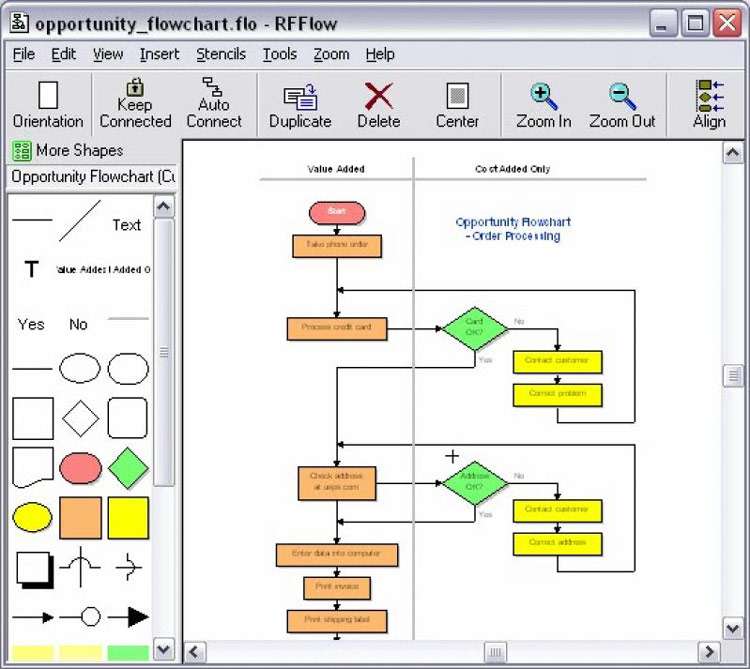
RFFlow 5.07 is a specialized diagram and flowchart drawing software designed to assist professionals in project management, business process modeling, education, and documentation. Developed to simplify the creation of visual representations, this tool offers extensive capabilities for crafting detailed diagrams, flowcharts, and more. Its user-friendly interface and robust feature set make it a valuable asset for generating reports, seminar presentations, and business process documentation, catering to both novice users and experienced professionals.
Overview of RFFlow and Its Role in Business and Project Management
RFFlow serves as a comprehensive diagram creator, enabling users to visualize complex information efficiently. The software is particularly relevant for project managers needing to map out project timelines and workflows, business analysts modeling processes, educators creating instructional materials, and professionals documenting procedures. Its primary purpose is to translate abstract concepts into clear, visual diagrams that enhance understanding and communication.
Extensive Shape Library and Customizable Diagram Tools
A key differentiator for RFFlow is its extensive library, featuring over 1600 pre-designed shapes. This vast collection supports the creation of a wide array of diagrams, including standard flowcharts, intricate organizational charts, detailed network diagrams, and adaptable business charts. Users can customize these shapes, lines, and text elements to precisely match their specific requirements, ensuring clarity and adherence to any branding or documentation standards.
Integration Capabilities with Microsoft Office and Corel WordPerfect Office
RFFlow offers strong integration capabilities, facilitating a seamless workflow with widely used productivity suites such as Microsoft Office and Corel WordPerfect Office. Diagrams created in RFFlow can be easily embedded into Word documents, PowerPoint presentations, or other office applications. This integration is crucial for professionals who need to incorporate visual aids into comprehensive reports, proposals, and client-facing materials without manual reformatting.
Image Export and Import Functionality
The software provides robust functionality for exporting diagrams into various common image file formats, making them suitable for web use, digital displays, or inclusion in external documents and publications. Furthermore, RFFlow allows users to import external images into their diagrams. This dual capability enhances the versatility of the software, enabling the creation of rich visual content with custom graphics and detailed layouts for diverse professional and educational applications.
User Interface and Accessibility for Beginners and Professionals
RFFlow is engineered with an emphasis on user accessibility, featuring a direct toolbar with readily available editing commands. This design philosophy ensures that users, even those without prior experience in specialized design software, can quickly learn and effectively utilize the tool. The intuitive interface speeds up the diagram creation process, allowing professionals to focus on content accuracy and project efficiency rather than on mastering complex software operations.
Practical Applications of RFFlow in Real-World Scenarios
RFFlow is applied across numerous real-world scenarios. Project managers utilize it for designing detailed project workflow diagrams, mapping dependencies and task sequences. Businesses employ it to create clear organizational charts, illustrate service delivery processes, and draft network infrastructure layouts. In education, RFFlow is valuable for developing visual aids for lectures, such as process flows or concept maps, and for producing professional-quality documentation for seminars and academic reports.
Frequently Asked Questions
What types of diagrams can I create with RFFlow 5.07?
RFFlow 5.07 supports creating a wide range of diagrams including flowcharts, organizational charts, network diagrams, office layouts, and various business and technical charts using its extensive library of over 1600 shapes. This comprehensive selection ensures that users can visually represent virtually any process or structure required for their work.
Can I use RFFlow diagrams in Microsoft Office documents?
Yes, RFFlow integrates well with Microsoft Office and Corel WordPerfect Office, allowing you to easily import your diagrams into Word, PowerPoint, or other office documents for enhanced presentations and reports. This feature streamlines the process of incorporating visual elements into your professional documents.
Is RFFlow suitable for users without design experience?
RFFlow is designed with an intuitive toolbar and easy-to-use commands, making it accessible for users with no prior experience in design software to quickly create professional-quality diagrams. The software’s focus on user-friendliness ensures a low learning curve for effective diagram creation.






Reviews
There are no reviews yet.