

Download Serif Affinity Publisher 1.10.5 – Advanced Desktop Publishing Software
Serif Affinity Publisher is a sophisticated desktop publishing application developed by Serif (Europe) Ltd, now a subsidiary of Canva. Initially released in 2019, it offers advanced features for graphic design and publishing professionals. This software is part of the comprehensive Affinity suite and is recognized for its robust capabilities in creating professional print and digital layouts, serving as a powerful alternative in the desktop publishing landscape.
Overview of Serif Affinity Publisher
Introduction to Desktop Publishing
Desktop publishing (DTP) is fundamental to modern graphic design, enabling the creation of visually rich documents for both print and digital media. High-quality layout design and precise typography are critical trends, allowing designers to produce everything from complex books to engaging marketing materials. Software in this category empowers professionals to control every aspect of their publication’s appearance.
Key Features and Tools
Design and Layout Capabilities
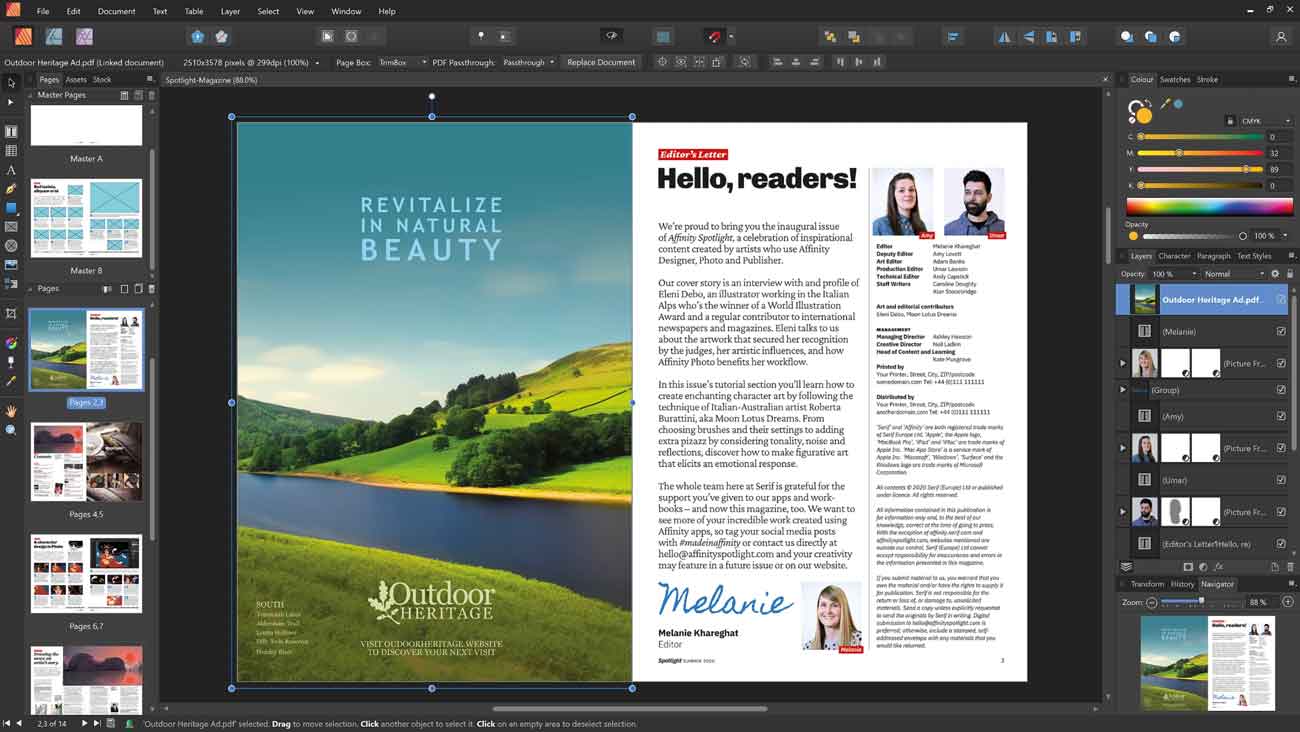
Serif Affinity Publisher provides a comprehensive suite of tools for precise design and layout management. Professionals can leverage its advanced features to construct sophisticated publications with ease and accuracy.
- Master pages enable the creation of consistent page elements and layouts across entire documents.
- Linked text frames allow for the flowing of text across multiple frames and pages, simplifying complex document structures.
- Advanced typography controls provide granular adjustments for character and paragraph styling, essential for professional publications.
- Vector graphics capabilities ensure that design elements can be scaled without loss of quality.
File Format Support
Ensuring broad compatibility, Serif Affinity Publisher supports a wide range of industry-standard file formats, facilitating seamless integration into existing workflows and allowing for the import and export of assets from various sources.
- Import and export of IDML files, the interchange format for Adobe InDesign documents.
- Full PDF import and export options, including support for PDF/X standards for print readiness.
- Compatibility with PSD (Photoshop Document) files, preserving layers and effects where possible.
- Support for common image formats such as JPG, PNG, and TIFF for incorporating graphics.
- Vector file format support, enabling the use of assets created in other vector editing applications.
Application Scenarios
Common Use Cases in Publishing
Serif Affinity Publisher is a versatile tool utilized across various publishing sectors for creating professional documents. Its capabilities cater to projects ranging from intricate book layouts to dynamic marketing collateral.
- Book Layout: Professionals use it for typesetting novels, textbooks, and technical manuals, managing pagination, chapters, and indexes efficiently.
- Magazine and Newspaper Design: The software is employed for creating multi-page publications, complex grids, and integrating rich media content for periodicals.
- Brochures and Flyers: For marketing and promotional materials, designers utilize Affinity Publisher to craft visually appealing flyers, brochures, andifolders with precise layout control.
- Digital Publications: It supports the creation of interactive PDFs and digital versions of publications, incorporating hyperlinks and other interactive elements.
Integration With Other Tools
Serif Affinity Publisher is designed to integrate smoothly into professional creative workflows, maximizing efficiency when used alongside other specialized software. Its compatibility ensures that designers can leverage various tools without compromising their workflow.
The software works alongside other applications in the Affinity suite, such as Affinity Designer for vector work and Affinity Photo for raster image editing. This synergy allows for seamless document creation and asset management. Compatibility with standard file formats also means it can interact with software from other developers, enabling a flexible approach to design projects.
Professional Use Insights and User Experience
User Testimonials and Case Studies
Professionals frequently turn to Serif Affinity Publisher for its robust feature set and accessible purchasing model. While specific public testimonials were not detailed in the research summary, the software’s adoption within the design community highlights its effectiveness.
Users often commend the software for its intuitive interface and powerful layout tools. The absence of a subscription fee, offering instead a one-time purchase, is a significant draw for freelancers and small studios. This model makes advanced desktop publishing capabilities more accessible, contributing to high user satisfaction for projects requiring detailed layout design and precise typography.
Comparison with Alternative Software
In the competitive landscape of desktop publishing software, Serif Affinity Publisher stands out primarily due to its innovative feature set coupled with a justifiable cost of acquisition. When compared to industry heavyweights, it provides a compelling value proposition.
While other platforms may offer extensive, long-established ecosystems, Affinity Publisher focuses on delivering core professional DTP functionality with high performance. Its one-time purchase model is a key differentiator, positioning it as an affordable alternative to subscription-based services without sacrificing essential advanced typography, color management, and layout design tools. This approach benefits users seeking professional-grade publishing software without ongoing financial commitments.
Frequently Asked Questions
What file formats does Serif Affinity Publisher support?
Serif Affinity Publisher supports a wide array of file formats, including IDML for interchange with Adobe InDesign, PDF for print and digital distribution, PSD for Photoshop compatibility, AI for vector assets, and common image types like JPG, PNG, and TIFF. This broad support ensures versatility for diverse publishing needs.
How does Affinity Publisher compare to Adobe InDesign?
Affinity Publisher is widely recognized as a cost-effective alternative to Adobe InDesign, offering many similar features such as master pages and advanced typography, but through a one-time purchase model instead of a subscription. This makes professional-level desktop publishing more accessible for individuals and businesses.
Can I create templates in Affinity Publisher?
Yes, Serif Affinity Publisher includes functionality for creating master pages and custom templates, allowing users to design consistent layouts for various projects efficiently. This feature streamlines the design process for recurring publication types.





Reviews
There are no reviews yet.