

Download Slyce Software FormulaDesk Suite 2026 – Advanced Excel Analysis Toolkit
FormulaDesk Suite 2026 is a comprehensive set of Excel add-ins developed by Slyce Software, designed to enhance data analysis, formula auditing, and workbook management. This toolkit is particularly valuable for professionals in financial services, data analytics and business intelligence, auditing, and engineering education, who require advanced capabilities beyond native Excel functions. The suite aims to transform spreadsheet workflows by improving accuracy, increasing analysis speed, and providing greater transparency in complex financial models and datasets.
Why FormulaDesk Suite Transforms Your Spreadsheet Workflows
FormulaDesk Suite integrates three powerful Excel add-ins—Spy, Math, and Navigator—into a single, cohesive toolkit. This unified approach streamlines complex tasks, significantly reducing the learning curve and integration time often associated with multiple third-party tools. By providing intuitive interfaces and robust features for error reduction, the suite enhances the speed and reliability of data analysis. Its transparent workflow design also ensures that users can easily understand and document their analyses, which is critical for compliance and collaborative projects.
In-Depth Formula Auditing with FormulaDesk Spy
Real-Time Formula Examination
FormulaDesk Spy offers unparalleled capabilities for examining spreadsheet formulas. Users can perform step-by-step evaluation of complex calculations, breaking down highly nested formulas into manageable components. This detailed breakdown aids in understanding intricate logic and identifying potential errors quickly.
The add-in provides real-time feedback on formula behavior, allowing for immediate adjustments. This dynamic analysis is crucial for troubleshooting and validating the accuracy of financial models and analytical reports.
Dependency Mapping and Circular Reference Detection
Spy enables users to visually trace the impact of specific cells on an entire workbook. It generates multi-sheet dependency graphs, clearly illustrating how inputs and calculations flow across different worksheets. This feature is essential for understanding the interconnectedness of large spreadsheets.
Advanced algorithms within Spy are adept at detecting and highlighting circular references, which can cause calculation errors or infinite loops in Excel. The visual representation of these loops simplifies their pinpointing and correction.
Performance Bottleneck Identification
Beyond error checking, FormulaDesk Spy helps optimize spreadsheet performance. It can identify calculation-intensive formulas or sections of a workbook that are slowing down recalculations. This allows users to focus their optimization efforts on the most impactful areas.
By pinpointing specific performance bottlenecks, Spy assists users in restructuring formulas or improving calculation logic. This leads to demonstrably faster workbook performance, especially critical for large and complex financial models.
Elevating Calculations Using FormulaDesk Math
Advanced Statistical and Regression Tools
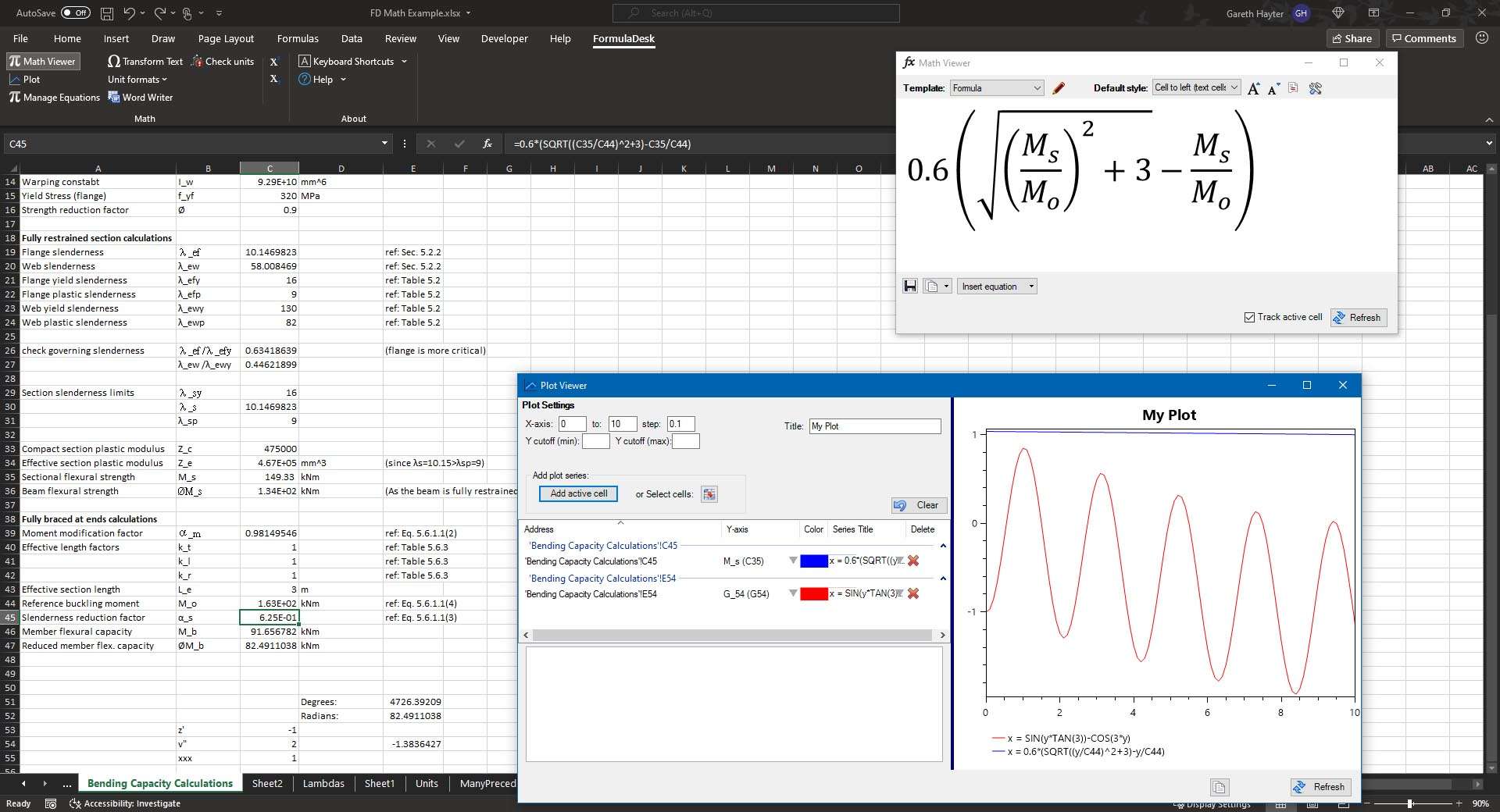
FormulaDesk Math extends Excel’s analytical power with a robust library for advanced statistics. It includes a comprehensive set of distribution functions, tools for hypothesis testing, and sophisticated forecasting models. These capabilities support in-depth statistical analysis and predictive modeling.
The add-in facilitates complex econometric analysis and data modeling, enabling users to derive deeper insights from their datasets. It is particularly useful for financial analysis and business intelligence applications.
Matrix Operations & Linear Algebra
For users dealing with large datasets or complex mathematical models, FormulaDesk Math offers powerful matrix operations. Capabilities include matrix inversion, eigenvalue decomposition, and singular value decomposition, which are fundamental in many engineering and scientific computations.
This module supports advanced curve fitting and regression analysis, allowing users to model relationships in data with high precision. It aids in tasks ranging from scientific research to financial portfolio optimization.
Engineering-Grade Computation Library
FormulaDesk Math provides specialized functions tailored for engineering applications. These include extensive unit conversion tools, libraries for solving differential equations, and the ability to create custom user-defined functions to extend Excel’s native capabilities.
The inclusion of an engineering-grade computation library makes it suitable for users in technical fields who require precise calculations, such as those involving physics, mechanical engineering, or chemical processes.
Mastering Workbook Organization with FormulaDesk Navigator
Rapid Range and Sheet Access
FormulaDesk Navigator enhances spreadsheet navigation, allowing users to quickly access critical parts of their workbooks. It provides immediate jump capabilities to named ranges, defined names, and other important areas within a spreadsheet.
The tool keeps track of recently used ranges and sheets, significantly reducing the time spent searching through large or complex Excel files.
Visual Workbook Mapping
Navigator offers a visual overview of the entire workbook structure. This “workbook map” provides a clear, hierarchical view of worksheets, named ranges, and data table locations, improving comprehension and organization.
Managing defined names is simplified through Navigator’s interface, allowing for efficient review, editing, and organization of all names used within a workbook.
Cross-Workbook Formula Tracing
A key feature of Navigator is its ability to trace formulas and cell dependencies across multiple open Excel files. This comprehensive tracing capability is invaluable for managing interconnected projects or analyzing data spread across several workbooks.
Users can benefit from consolidated cell browsing and navigation, making it easier to audit and understand complex data structures that extend beyond a single file.
Seamless Integration Across All Three Modules
FormulaDesk Suite operates under a unified, single-ribbon interface within Excel. This integrated design ensures that each module—Spy, Math, and Navigator—works harmoniously, providing a cohesive user experience without the need to switch between different toolbars or applications.
Shared settings and configurations across the modules simplify management, while the ability to generate unified reports from any module enhances workflow efficiency. This seamless interaction minimizes context switching and maximizes productivity.
What’s New in FormulaDesk Suite 2026
The 2026 release of FormulaDesk Suite introduces several key enhancements designed to improve user experience and compatibility. Notably, it now offers full dark-mode support, aligning its interface with modern application design trends and user preferences for reduced eye strain.
Performance optimizations have been implemented throughout the suite for faster calculations and data processing. Additionally, version 2026 enhances integration with cloud storage services like SharePoint, improving collaboration and accessibility for teams working with online spreadsheets. Multi-monitor display support has also been refined for better window management and productivity.
Real-World Applications and Success Stories
In financial auditing, FormulaDesk Suite is instrumental in verifying complex financial models. FormulaDesk Spy’s detailed precedent and dependent tracing across numerous sheets helps auditors ensure accuracy and compliance by quickly identifying errors or inconsistencies in reporting structures.
For business intelligence professionals, FormulaDesk Math and Navigator are crucial for preparing data for dashboards. Math’s advanced statistical functions and Navigator’s efficient workbook management allow BI analysts to clean, transform, and organize large datasets more effectively, ensuring reliable data inputs for reporting tools.
In academic settings, engineering educators and students benefit from the suite’s specialized tools. FormulaDesk Math’s engineering-grade computation library and custom function capabilities enable the creation and analysis of complex problem sets, facilitating hands-on learning in quantitative subjects.
Frequently Asked Questions
How can FormulaDesk Spy help me trace a formula across multiple worksheets?
FormulaDesk Spy automatically generates a visual dependency map that spans all open worksheets, allowing you to click through precedents and dependents across sheets. You can also export the map for documentation or compliance, providing a clear audit trail for complex spreadsheet logic.
Does FormulaDesk Math support matrix operations and curve fitting within Excel?
Yes. FormulaDesk Math includes a full suite of matrix algebra functions, such as inversion and eigenvalue decomposition, and advanced curve-fitting tools for regression and optimization, all accessible via Excel-native formulas and structures.
Is FormulaDesk Suite 2026 compatible with Excel’s dark mode and online environments?
FormulaDesk 2026 adds full support for Excel’s dark theme on desktop and improved integration with Excel Online and SharePoint, ensuring consistent visuals and functionality across platforms, enhancing usability whether working locally or in a cloud-based environment.






Reviews
There are no reviews yet.