

Download SSD Booster .NET 19.3 – Windows Utility for Advanced SSD Optimization
SSD Booster .NET 19.3 is a specialized system optimization utility designed for Windows PC users aiming to enhance the performance and longevity of their Solid State Drives (SSDs). Developed for individuals who frequently manage system settings, including power users, system administrators, and tech enthusiasts, this software provides direct control over various Windows features that specifically impact drive efficiency. It serves as an essential tool for anyone seeking to fine-tune their SSD’s operation for maximum speed and durability within the Windows environment.
Advanced SSD Optimization for Windows Systems
Optimizing Solid State Drives (SSDs) on Windows systems is crucial for maximizing both operational speed and extending the drive’s lifespan. SSDs differ fundamentally from traditional Hard Disk Drives (HDDs) in their data handling and wear characteristics. SSD Booster .NET facilitates this optimization by offering users straightforward management of key Windows features that influence SSD behavior. The software allows for quick adjustments to system-level settings that, by default, may not be configured for optimal SSD performance, ensuring the drive operates efficiently and reduces unnecessary wear.
Detailed Control over Key SSD-related Windows Features
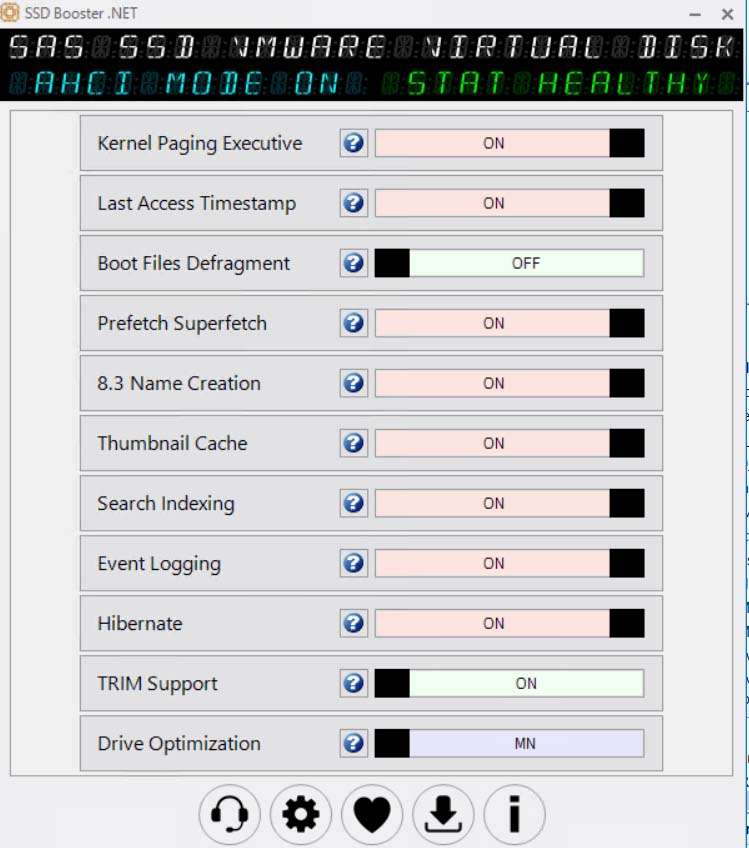
SSD Booster .NET empowers users by providing direct access to manage critical Windows features that have a significant impact on SSD performance and durability. These features are often buried within complex system menus, making manual adjustments tedious. The tool simplifies this process by offering dedicated toggles for:
- Hibernate: Disabling hibernation can save SSD space and reduce write cycles, as hibernation files can be substantial.
- Drive Optimization: This feature allows users to manage defragmentation and TRIM command scheduling, which are essential for SSD health and performance, although Windows often handles this automatically.
- Event Logging: Reducing the volume of system event logs written to disk can minimize unnecessary write operations on the SSD.
- Prefetch and Superfetch: Adjusting these caching mechanisms can sometimes improve application load times and reduce background SSD activity, although their effectiveness varies with system usage.
- 8.3 Name Creation: Managing the creation of short MS-DOS file names for NTFS volumes can reduce file system overhead, potentially offering minor performance gains and reducing writes.
Streamlined, Portable Interface for Quick Adjustments
A key differentiator for SSD Booster .NET is its emphasis on a simple, installation-free user interface. This portable design allows users to run the utility directly from an executable file, making it an ideal solution for system administrators managing multiple machines or for power users who prefer to keep their systems free of installed applications. The straightforward UI typically employs visual indicators, such as green and red sliders or toggles, to clearly show the status of each adjustable Windows feature. This design philosophy ensures that users can quickly identify settings and apply changes without navigating through intricate Windows dialogs.
System Information Access and Hardware Overview
Beyond its optimization features, SSD Booster .NET includes a system information panel designed to provide users with essential details about their hardware and operating system. This overview typically displays information such as the Windows version, CPU details, RAM capacity, and specific attributes of the detected SSDs. Access to this information within the same utility supports users by ensuring they are aware of their system’s specifications as they make optimization adjustments, allowing for more informed decisions regarding settings modifications.
Use Cases and Benefits for Power Users
SSD Booster .NET is particularly beneficial for a range of technical professionals and enthusiasts who seek to extract maximum value from their SSDs. Advanced users can leverage this tool in various scenarios:
- Gaming: Fine-tuning system settings can potentially reduce load times and ensure smoother in-game performance by minimizing background disk activity.
- Software Development: Developers often work with large projects and require fast build times and responsive development environments, which can be aided by optimized SSD performance.
- IT Professionals: For managing workstations or servers, the portability and direct control offered by the tool allow for efficient deployment of SSD optimization settings across multiple systems.
- PC Enthusiasts: Users focused on achieving peak system performance will find the granular control over SSD-related Windows features valuable for fine-tuning their hardware.
- Extending SSD Lifespan: By reducing unnecessary write operations, the software contributes to the longevity of the SSD, which is particularly important for drives with limited write endurance.
Comparison with Other SSD Optimization Utilities
While numerous software utilities exist to manage SSD performance, SSD Booster .NET distinguishes itself through its portability and focused approach. Many comprehensive system optimization suites offer a wide array of functions, often requiring installation and presenting a more complex user experience. In contrast, SSD Booster .NET concentrates specifically on the direct toggling of advanced, SSD-relevant Windows features. Its installation-free nature and simplified interface cater to users, particularly power users and administrators, who prioritize quick accessibility and straightforward control over essential system settings without the overhead of larger applications.
Frequently Asked Questions
How does SSD Booster .NET improve the performance of my SSD on Windows?
SSD Booster .NET optimizes SSD performance by allowing users to enable or disable various Windows features that affect SSD speed and longevity, such as hibernation, drive optimization, and prefetch settings. These adjustments reduce unnecessary writes and system overhead on the SSD, contributing to both faster operation and extended drive life.
Is SSD Booster .NET safe to use without impacting system stability?
Yes, SSD Booster .NET provides user-controlled toggles for Windows SSD-related features without making permanent system-level changes that could jeopardize stability. However, it is primarily aimed at power users who possess a foundational understanding of Windows system settings to effectively manage these tweaks and avoid unintended consequences.
What makes SSD Booster .NET portable and how does that help?
SSD Booster .NET does not require installation; it runs directly from its executable file. This portability allows users to quickly access and modify SSD settings on multiple Windows machines without the need for setup or cluttering the system with installed software, making it convenient for mobile users and system administrators.






Reviews
There are no reviews yet.