
Download VectorDraw File Converter 11.2 – Professional CAD File Format Conversion Tool
VectorDraw File Converter 11.2 is a specialized CAD utility engineered for efficient batch conversion and management of numerous native CAD and drawing file formats. Developed with the needs of mechanical engineers, manufacturers, and design professionals in mind, this software serves as a critical tool for ensuring interoperability and data integrity across diverse CAD environments. Its primary function is to facilitate seamless file exchange, archiving, and repurposing of technical drawings, making it an essential component in modern design and manufacturing workflows.
Overview of VectorDraw File Converter in Mechanical and Manufacturing CAD Workflows
In the mechanical and manufacturing sectors, precise and compatible CAD data is paramount. VectorDraw File Converter addresses this by providing a robust solution for managing the complex array of file formats encountered daily. It ensures that designs created in one CAD system can be effectively utilized or shared with others, circumventing common compatibility issues that can halt projects or introduce errors. Its role is particularly significant in enabling collaborative design processes and maintaining accurate historical project data through reliable format conversion.
Supported File Formats and Conversion Capabilities
VectorDraw File Converter boasts extensive support for a wide range of industry-standard and legacy CAD file formats, ensuring flexibility for professionals working with different software tools and project histories. The conversion capabilities include:
- Import/Export: Supports DWG (up to version 2023), DXF, DGN, SKP, PDF, HP-GL, SVG, and DWF.
- Raster Formats: Capable of handling BMP, TIFF, GIF, JPG, and PNG.
- 3D Model Formats: Includes support for OBJ, PLY, and COLLADA DAE, broadening its utility for 3D design and interoperability.
- LIDAR Data: Can process LAS/LAZ files, catering to advanced surveying and reality capture workflows.
The software excels at converting between these vector and raster formats, offering professionals the ability to adapt drawings for different applications, from detailed CAD editing to image-based presentations and documentation.
Advanced Conversion Features and Customization Options
To enhance productivity and control over conversion processes, VectorDraw File Converter incorporates several advanced features:
- Multi-threaded Batch Conversion: Allows for the simultaneous processing of numerous files, significantly reducing the time required for large conversion tasks.
- Version Selection: Users can specify output versions for formats like DWG (e.g., saving to DWG 2010), ensuring compatibility with older CAD software.
- Multi-page PDF Export: Enables the creation of single PDF documents from drawings with multiple sheets or layouts.
- Preview Image Options: Provides capabilities to save preview images alongside converted files for quick visual reference.
- Viewer Customization: Offers various settings to tailor the built-in viewer experience.
These features allow users to tailor the conversion output precisely to project requirements and workflow needs.
Integration and Use Cases in Industry Projects
VectorDraw File Converter finds practical application across various industry projects, streamlining common challenges related to CAD data exchange:
- Interoperability in Manufacturing: Facilitates the seamless transfer of design files between different CAD/CAM software used on the shop floor and in design offices, from initial concept to production.
- Construction Data Management: Enables architects and construction engineers to convert plans and drawings into formats compatible with project management software or for client presentations.
- Archiving Legacy Projects: Supports the conversion of older CAD drawing versions into more current or universally accessible formats, ensuring long-term data accessibility and usability.
- Workflow Streamlining: Automates repetitive conversion tasks through batch processing, freeing up valuable time for design and engineering professionals.
- Cross-Disciplinary Collaboration: Allows teams using different specialized software (including 3D modeling and GIS tools) to share and integrate design components effectively.
Built-in Viewer and Additional Functionalities for Enhanced Productivity
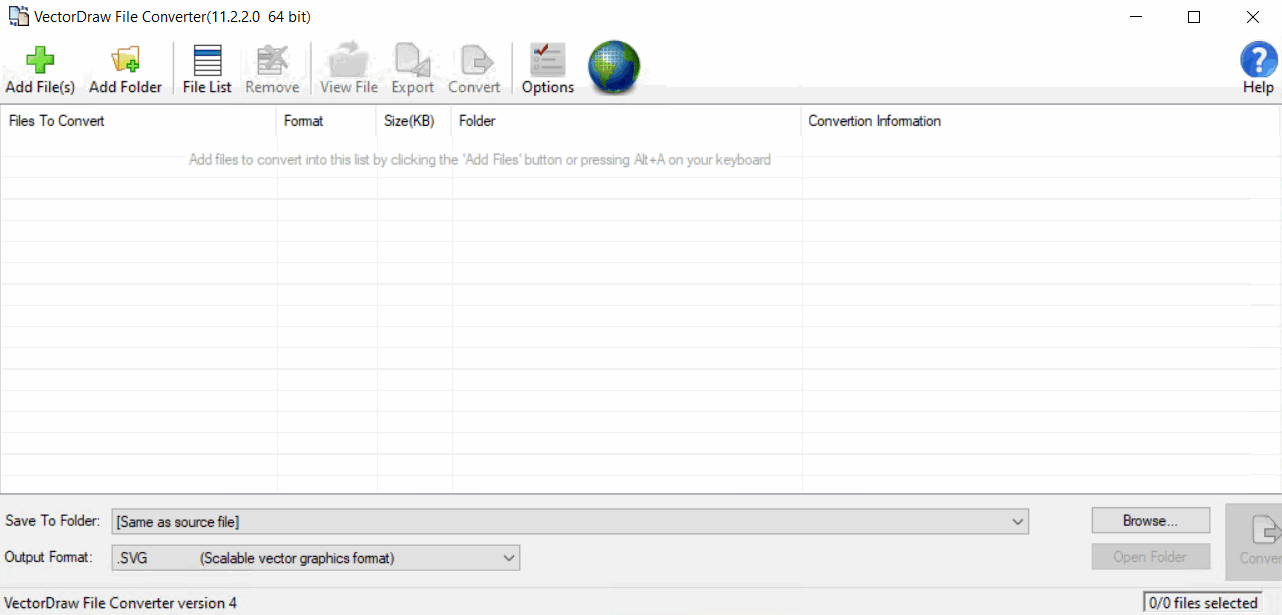
Beyond its core conversion engine, VectorDraw File Converter includes a built-in viewer that enhances productivity by allowing users to inspect, zoom, and print drawings directly within the application without needing to open the native CAD software. This viewer functionality, combined with a user-friendly list management system for defining and tracking conversion tasks, streamlines the overall workflow. The support for LIDAR point cloud data files (LAS/LAZ) further expands its utility for professionals working with reality capture data in fields like civil engineering and surveying.
Frequently Asked Questions
How does VectorDraw File Converter support different DWG file versions?
VectorDraw File Converter supports importing and exporting DWG files ranging from version 12 through the latest AutoCAD 2023 formats. This wide compatibility ensures that users can work seamlessly with both legacy and recent CAD projects, addressing common version control challenges in professional environments.
Can VectorDraw File Converter handle batch processing of multiple CAD drawings?
Yes, VectorDraw File Converter includes multi-threading support enabling the simultaneous conversion of multiple drawing files, significantly improving workflow efficiency for professionals managing large volumes of CAD data. This feature is crucial for large-scale projects or routine data management tasks.
Does the software provide conversion to formats usable outside of CAD programs?
Absolutely, the software supports exporting drawings not only to other CAD formats but also to widely used formats such as PDF, SVG, and common raster image formats (BMP, TIFF, JPG, PNG). This versatility facilitates sharing and documentation beyond CAD environments, making it useful for presentations and reports.






Reviews
There are no reviews yet.