

Download Wondershare Filmora 15.2.5 – AI-Enabled Video Editing for Creators
Wondershare Filmora 15.2.5 is an advanced yet accessible non-linear video editor designed for digital content creators. Developed by Wondershare, this software empowers users across various fields, including YouTube creators, social media managers, e-learning developers, and small businesses, to produce professional-quality videos efficiently. The latest iteration enhances its suite of AI-driven tools and rendering capabilities, building upon its reputation for an intuitive user experience.
Streamlined Interface and Workflow
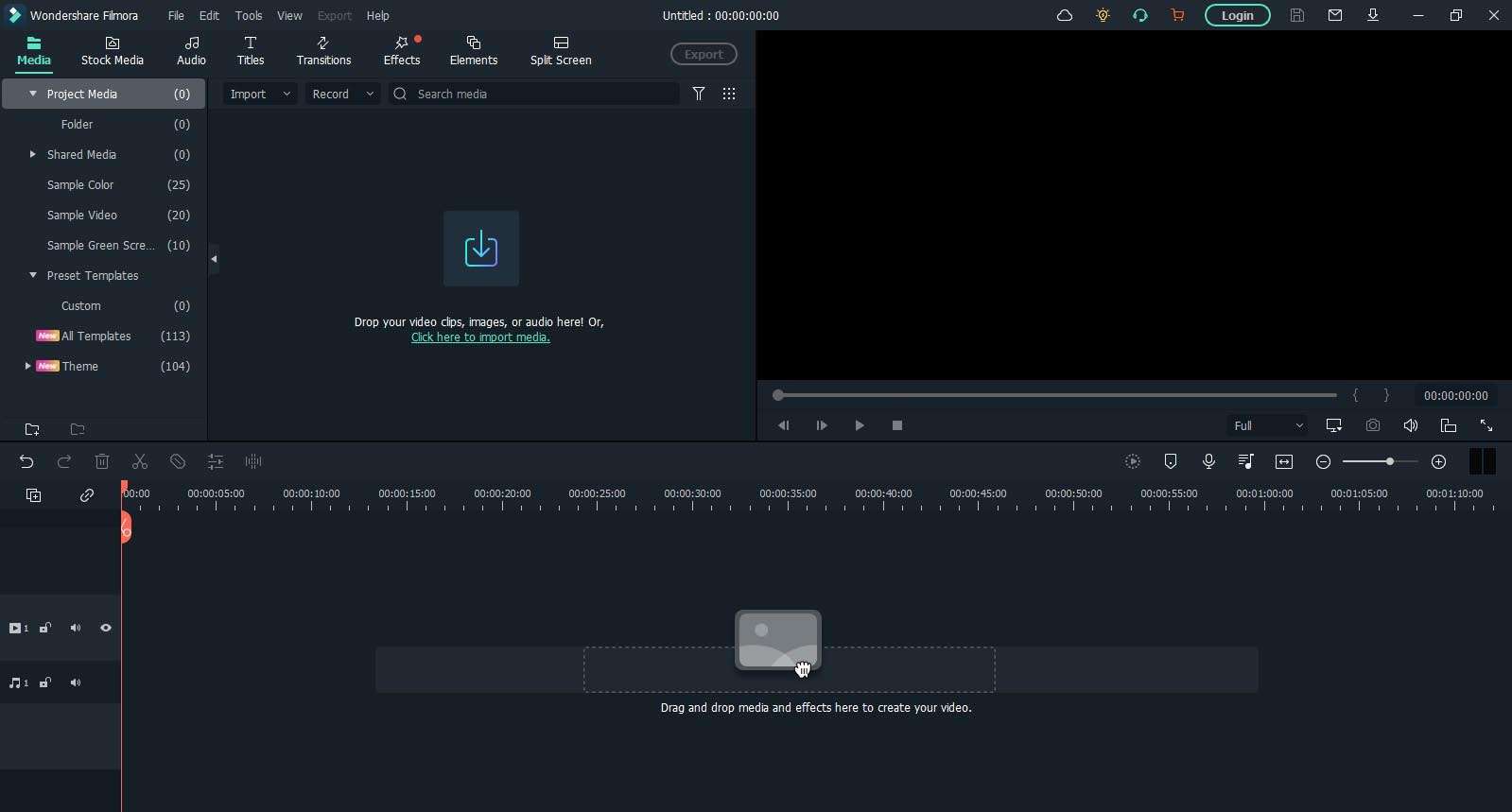
Filmora 15.2.5 is engineered with a focus on user efficiency, offering a clean interface that simplifies complex video editing tasks. The design prioritizes rapid content creation without compromising on advanced functionality.
Drag-and-Drop Timeline Design
The core of Filmora’s editing experience is its intuitive drag-and-drop timeline. This multi-track environment allows users to easily arrange video clips, images, and audio elements. Thumbnail previews directly on the timeline enhance visual navigation, making clip management straightforward for both beginners and experienced editors.
Customizable Workspace
Users can tailor the Filmora 15.2.5 workspace to match their personal editing style. Movable tool panels and adjustable layout options ensure that frequently used functions are readily accessible. The robust undo and redo system provides a safety net, encouraging experimentation and flexible workflow adjustments.
Intelligent AI-Driven Editing Tools
Wondershare Filmora 15.2.5 integrates a comprehensive suite of artificial intelligence features to automate and accelerate common editing processes. These AI tools are designed to overcome time-consuming manual tasks, allowing creators to focus on the creative aspects of their projects.
Auto Scene Detection & Smart Trim
The AI Auto Cut and enhanced AI scene detection capabilities in Filmora 15.2.5 automatically analyze footage, identifying scene changes and transitions. This allows for rapid rough cuts, effectively trimming raw footage and arranging clips into a coherent sequence with minimal manual intervention, thereby saving significant editing time.
AI Voice Cloning & Text-to-Video
This version introduces advanced AI features such as AI Voice Cloning, enabling users to replicate voiceovers with impressive accuracy. Dynamic Captions, powered by AI, can be generated automatically from audio tracks, vastly improving accessibility and viewer engagement. Furthermore, the Text-to-Video functionality converts text prompts into visual content, streamlining the creation of explainer videos and social media clips.
Extensive Effects, Transitions & Filmstock Integration
Filmora 15.2.5 offers a vast collection of creative assets and effects, augmented by seamless integration with the Filmstock subscription library. This provides users with continuous access to fresh visual elements to enhance their video projects.
Built-In Library of Filters and Transitions
The editor comes pre-loaded with a diverse range of professional-looking filters, color grading presets, animated titles, and engaging transitions. These assets can be applied quickly to alter the mood, style, and pacing of video content.
Advanced Motion Tracking & Split-Screen Templates
For more dynamic video storytelling, Filmora 15.2.5 includes advanced motion tracking. This feature allows users to attach graphics, text, or other video elements to moving subjects within the frame. A selection of pre-designed split-screen templates further simplifies the creation of picture-in-picture effects and comparison videos.
Precision Audio Mixing and Enhancement
Audio quality is crucial for professional video production, and Filmora 15.2.5 provides a robust set of tools for audio refinement and mixing.
Noise Reduction & Auto Ducking
The software includes tools for removing unwanted background noise from recordings, cleaning up dialogue and audio tracks. The auto ducking feature intelligently lowers the volume of background music or sound effects when speech is detected, ensuring clear narration and dialogue prominence in the final mix.
Royalty-Free Music and Sound Effects
Access to Filmstock’s extensive library of royalty-free music tracks and sound effects is integrated directly into Filmora. This allows creators to easily find and implement suitable audio elements without copyright concerns, complemented by in-app mixer controls for precise level adjustments.
Advanced Color Correction and Grading
Filmora 15.2.5 offers comprehensive color correction and grading tools to achieve specific visual aesthetics and ensure color consistency across footage.
Basic Adjustments and LUT Support
Users can perform fundamental color adjustments, including exposure, contrast, saturation, and white balance, directly within the editor. The software also supports the import and application of Look-Up Tables (LUTs) for sophisticated color grading and maintaining a consistent cinematic look.
Cinematic Presets for Professional Looks
Beyond manual adjustments, Filmora provides a curated collection of cinematic presets. These one-click grading templates are inspired by various film genres and styles, enabling users to quickly apply professional color looks to their videos.
Screen Recording and Tutorial Creation
Designed to meet the needs of educators and software demonstrators, Wondershare Filmora 15.2.5 includes integrated screen recording functionality. This feature allows users to capture high-quality video of their computer screen, system audio, and webcam simultaneously. Annotation tools provide capabilities for highlighting elements, drawing shapes, and adding text overlays, making it an ideal solution for creating e-learning content and software tutorials.
Export Options and Social Media Optimization
Finalizing a video project involves efficiently exporting it for various platforms, and Filmora 15.2.5 offers flexible options tailored for modern content distribution.
Platform Presets & Aspect Ratio Templates
The software provides pre-configured export settings optimized for popular platforms such as YouTube, TikTok, and Instagram. Users can easily select aspect ratios and resolutions suitable for vertical video, standard widescreen, and square formats, streamlining the process of tailoring content for specific social media channels.
GPU-Accelerated Rendering for Faster Exports
Wondershare Filmora 15.2.5 leverages GPU acceleration (hardware acceleration) to significantly speed up video rendering and export times, particularly for high-resolution projects like 4K footage. This optimization ensures quicker turnaround times, allowing creators to publish their work faster on supported hardware configurations.
Frequently Asked Questions
What’s new in Wondershare Filmora 15.2.5?
Version 15.2.5 introduces enhanced AI scene detection and smart trim, an expanded library of filters and transitions via Filmstock, and GPU-accelerated rendering for smoother 4K exports. It also refines audio ducking precision and reorganizes interface elements for a more efficient workflow.
How does the AI Auto Cut feature in Filmora 15.2.5 work?
AI Auto Cut analyzes your footage to identify scene boundaries automatically, then trims and arranges clips to create a coherent rough cut. This significantly reduces manual editing time, letting you focus on creative fine-tuning rather than basic clip sequencing.
Does Filmora 15.2.5 support 4K editing and GPU acceleration?
Yes. Filmora 15.2.5 supports full-resolution 4K editing and utilizes GPU acceleration (NVIDIA, AMD, Intel) to speed up timeline playback and export rendering, ensuring smoother performance on compatible hardware.






Reviews
There are no reviews yet.