

Download Zebra CardStudio Professional 2.5 – Advanced ID Card and Badge Design Software
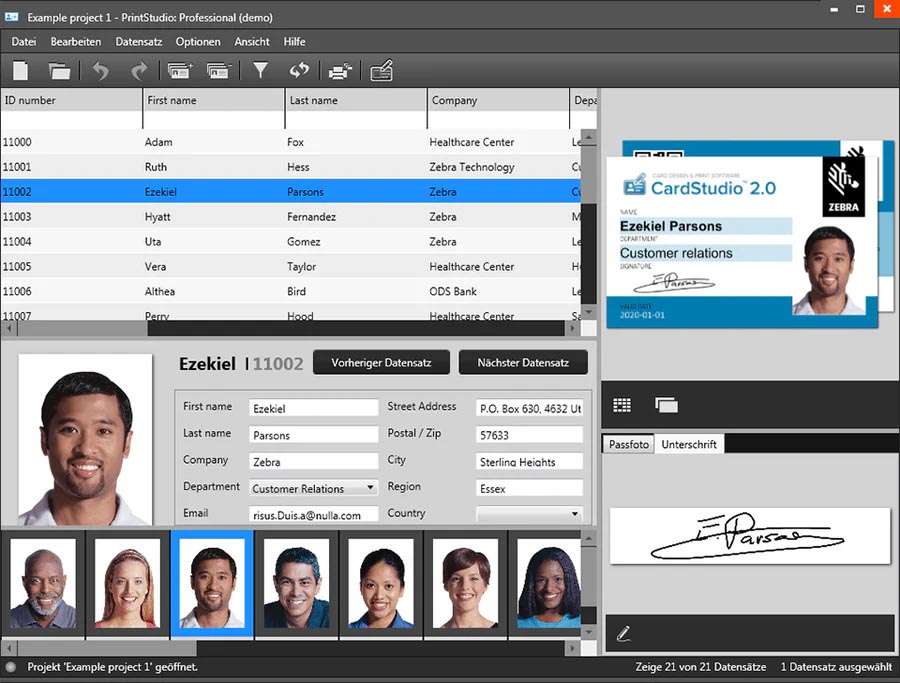
Zebra CardStudio Professional 2.5 is a specialized ID card and badge design application, developed by Zebra Technologies Corporation. This software is designed to work seamlessly with Zebra’s range of card printers, offering an integrated solution for secure ID card issuance. It caters to professionals in corporate security, government organizations, educational institutions, event management, and print service providers who require robust tools for designing, encoding, and printing identification and access control credentials.
Overview of Zebra CardStudio Professional and Its Applications
Zebra CardStudio Professional is a comprehensive solution for creating professional-grade ID cards and badges. Developed by Zebra Technologies, a leader in marking, tracking, and printing solutions, this software leverages the deep integration with Zebra’s card printer hardware to provide a streamlined end-to-end process. Its primary applications span across sectors that demand secure identification, including corporate security for employee badges, educational institutions for student IDs, government for official credentials, and event management for attendee passes. Print service providers also utilize its capabilities for custom card production.
Advanced Card Design Tools and Encoding Technologies
CardStudio Professional offers a robust set of design tools to create visually appealing and functional ID cards. Its template-based design system allows for efficient creation and management of card layouts, while drag-and-drop functionality simplifies the placement of various elements. The software includes photo editing capabilities for applicant images and supports advanced encoding technologies essential for modern access control and data management systems. This includes the ability to encode magnetic stripes (HiCo/LoCo), contact smart chips, and various types of contactless RFID cards, ensuring versatility in credential issuance.
Database Integration for Efficient Batch Card Printing
To facilitate high-volume ID card production, Zebra CardStudio Professional provides robust database connectivity. The software supports imports from common data sources such as Microsoft Excel spreadsheets, Access databases, and SQL databases. This integration allows users to easily import applicant information, photos, and other relevant data, thereby streamlining the process of batch card printing. This capability is critical for organizations needing to issue a large number of secure ID cards efficiently and accurately.
Security Features Ensuring Card Authenticity and Protection
Security is a paramount concern in ID card issuance, and Zebra CardStudio Professional addresses this with a range of specialized features. The software enables the incorporation of various security elements directly onto the card designs to deter counterfeiting and enhance authenticity. These features include the ability to add watermarks, create ghost images, support for holographic overlays, and integration with UV printing capabilities. These advanced security options are vital for environments where card integrity and access control are critical.
Print Management and Dual-Sided Card Layouts
Effective print management is crucial for professional ID card production. Zebra CardStudio Professional includes a WYSIWYG (What You See Is What You Get) editor, providing a true preview of the card design as it will appear when printed. Alignment tools assist in precise placement of card elements, ensuring professional results. The software fully supports both single-sided and dual-sided card printing, allowing for comprehensive layouts that can include photos, text, graphics, and encoding data on both sides of the card.
Improvements and Compatibility Updates in Version 2.5
Version 2.5 of Zebra CardStudio Professional introduces several enhancements aimed at improving performance, compatibility, and user experience. Key updates include improved compatibility with Windows 11, ensuring stable operation on the latest operating systems. It also features updated printer drivers to support newer Zebra card printer models, alongside more reliable and faster database connectivity options. Expanded barcode support and a streamlined user interface further contribute to a more efficient and user-friendly design and printing workflow.
Use Cases from Industries Relying on Zebra CardStudio Professional
The versatile capabilities of Zebra CardStudio Professional are leveraged across various industries to meet specific identification needs. In corporate environments, it is used for printing secure employee badges that incorporate access control features and branding. Educational institutions rely on it for issuing student ID cards that may include library access, meal plan information, and security identifiers. For event management, the software facilitates the creation of attendee badges or credentials with unique ticketing or access information. Print service providers utilize Zebra CardStudio Professional to offer custom ID card solutions to a broad range of clients, benefiting from its robust design and encoding capabilities.
Frequently Asked Questions
What card technologies does Zebra CardStudio Professional 2.5 support?
Zebra CardStudio Professional 2.5 supports multiple card encoding technologies including magnetic stripes (HiCo/LoCo), contact smart chips, and contactless RFID cards. This enables creating secure and versatile ID cards applicable for various security and access control needs.
Can Zebra CardStudio Professional connect to existing databases for batch printing?
Yes, the software integrates with databases such as Microsoft Excel, Access, and SQL, allowing users to import data records and perform batch printing efficiently, which is essential for managing large groups of ID cards.
What are the new features introduced in Zebra CardStudio Professional version 2.5?
Version 2.5 includes enhanced Windows 11 compatibility, updated drivers for newer Zebra printers, faster and more reliable database connectivity, expanded barcode and QR code support, and a redesigned user interface for improved usability.




Reviews
There are no reviews yet.