

Download Axialis IconGenerator v2.10 – Professional Icon Design & Customization Tool
Axialis IconGenerator v2.10 is an icon design and management tool developed by Axialis Software, known for its professional graphic design applications. This software is specifically engineered to provide users, including those without extensive design experience, with access to a vast library of customizable icons. It caters to professionals across UI/UX design, web development, software engineering, and game development who require high-quality, platform-specific graphical assets.
Discover a Vast, Continuously Updated Icon Library
Axialis IconGenerator provides an expansive collection of icons designed to meet diverse project needs. The library is structured for efficient browsing and immediate use, ensuring users can quickly find the exact visual elements required.
Organized Categories and Instant Search
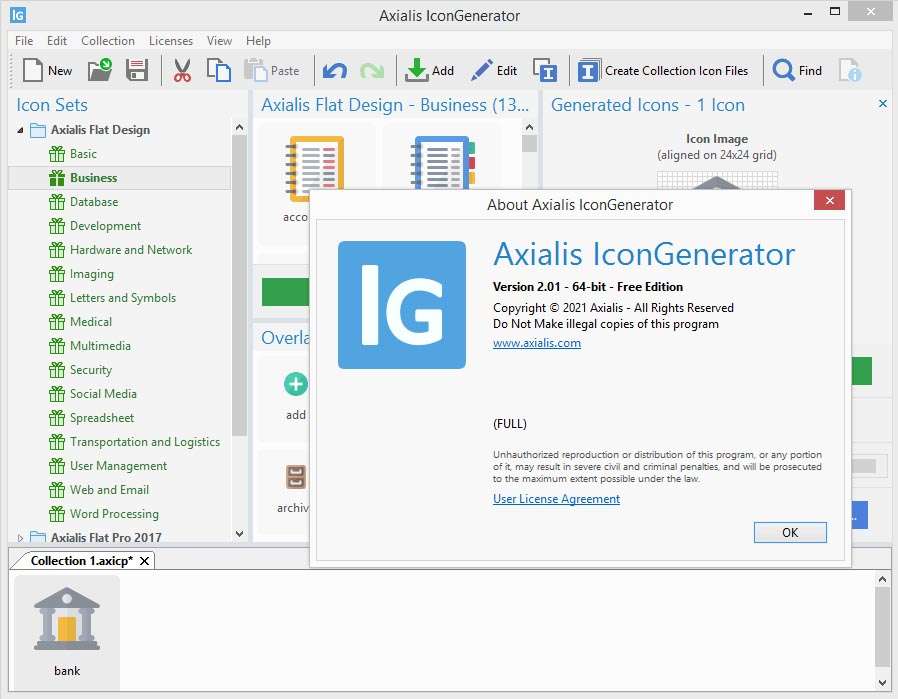
Users can navigate the extensive icon library through intuitively organized categories, making it simple to locate icons by theme, industry, or application type. An instant search function further refines this process, allowing for rapid retrieval of specific graphical assets without extensive browsing.
Monthly Automated Icon Updates
To ensure that users always have access to current design trends, Axialis IconGenerator incorporates a monthly automated icon update system. When connected to the internet, the software will automatically download new icons from Axialis’s online repository, ensuring the library remains fresh and relevant to contemporary design standards.
Powerful Visual Customization and Styling
Beyond its extensive library, Axialis IconGenerator offers robust tools for visual customization, enabling users to adapt icons to their unique project aesthetics. The software emphasizes intuitive controls for modifying key visual attributes.
Color, Size, Shadow, and Effect Adjustments
Users can fine-tune the appearance of any icon through straightforward adjustments to color palettes, dimensions, and the application of shadows or other visual effects. A real-time preview allows for immediate feedback on modifications, facilitating an efficient customization workflow.
Combining Elements & Style Variations
The software supports combinations of design elements, allowing users to layer shapes, glyphs, and stylistic variations. Options for filled versus outline styles, or even 3D treatments, can be applied to create unique icon sets that precisely match design requirements.
Export in All Major Formats for Any Platform
Axialis IconGenerator is equipped to export icons in a comprehensive range of formats, ensuring compatibility across various platforms, applications, and design workflows. This flexibility supports both scalable vector graphics and fixed-resolution bitmap outputs.
Vector Exports: SVG, XAML, PDF, EPS, PS
For maximum scalability and high-quality rendering in print or high-resolution displays, the software supports essential vector formats. These include Scalable Vector Graphics (SVG), Extensible Application Markup Language (XAML) for UI frameworks, and standard formats like Portable Document Format (PDF), Encapsulated PostScript (EPS), and PostScript (PS).
Bitmap Exports: PNG, BMP, JPG, ICO, ICNS
To facilitate use in digital interfaces, websites, and operating system applications, Axialis IconGenerator provides robust bitmap export options. This includes Portable Network Graphics (PNG) for web and application icons, Bitmap (BMP), Joint Photographic Experts Group (JPG), and specific icon formats like ICO for Windows and ICNS for macOS.
Seamless Integration into Design Workflows
Axialis IconGenerator is designed to complement existing design processes, offering features that streamline the workflow for both individual assets and batch operations.
Compatibility with Popular Design Tools
While Axialis IconGenerator operates as a standalone application rather than a direct plugin, its exported files integrate smoothly into professional design suites. Artists can import generated icons into software such as Adobe Illustrator, Sketch, or Figma for further manipulation or incorporation into larger projects.
Batch Processing and Template Support
For projects requiring multiple icon variations or entire icon sets, the software supports template batch processing. This feature automates the export of a series of icons based on predefined settings, significantly enhancing efficiency and ensuring consistency across large collections.
Real-World Use Cases and Industry Examples
Axialis IconGenerator is utilized across various professional domains to create essential graphical assets. Professionals leverage its capabilities for:
- UI/UX Design: Crafting consistent and visually appealing icons for web applications, mobile interfaces, and software dashboards.
- Game Development: Designing icons for in-game interfaces, heads-up displays (HUDs), and character assets.
- Web Development: Generating clear and recognizable favicons, toolbar icons, and navigation elements for websites.
- Documentation and Presentations: Creating custom icons to illustrate points or enhance the visual structure of technical documents and slideshows.
- App Development: Producing application icons that meet specific platform requirements for storefronts and user environments.
Comparing Axialis IconGenerator to Other Icon Tools
Axialis IconGenerator occupies a distinct niche within the landscape of graphic design tools. Unlike comprehensive graphic editors like Adobe Photoshop or Illustrator, its focused approach prioritizes icon creation and management, making it more efficient for this specific task. Compared to icon font services such as FontAwesome, IconGenerator offers greater customization control over individual vector and bitmap assets, allowing for unique styling beyond predefined glyphs. While Axialis also offers the professional editor IconWorkshop, IconGenerator specializes in providing a vast, up-to-date library with simplified customization, aimed at accelerating workflow for users who may not be dedicated graphic designers.
Frequently Asked Questions
What file formats can I export from Axialis IconGenerator?
Axialis IconGenerator supports both vector and bitmap exports, including SVG, XAML, PDF, EPS, PS for scalable vector outputs, and PNG, BMP, JPG, ICO, ICNS for bitmap needs.
How does IconGenerator keep its icon library up to date?
When connected to the internet, IconGenerator automatically downloads new icons monthly from Axialis’s online repository, ensuring you always have access to the latest design trends without manual updates.
Can I integrate Axialis IconGenerator with other design tools like Illustrator?
While IconGenerator does not directly integrate as a plugin, you can import exported icons into design suites such as Adobe Illustrator or Sketch for further editing, and use batch export features to streamline workflows.






Reviews
There are no reviews yet.