

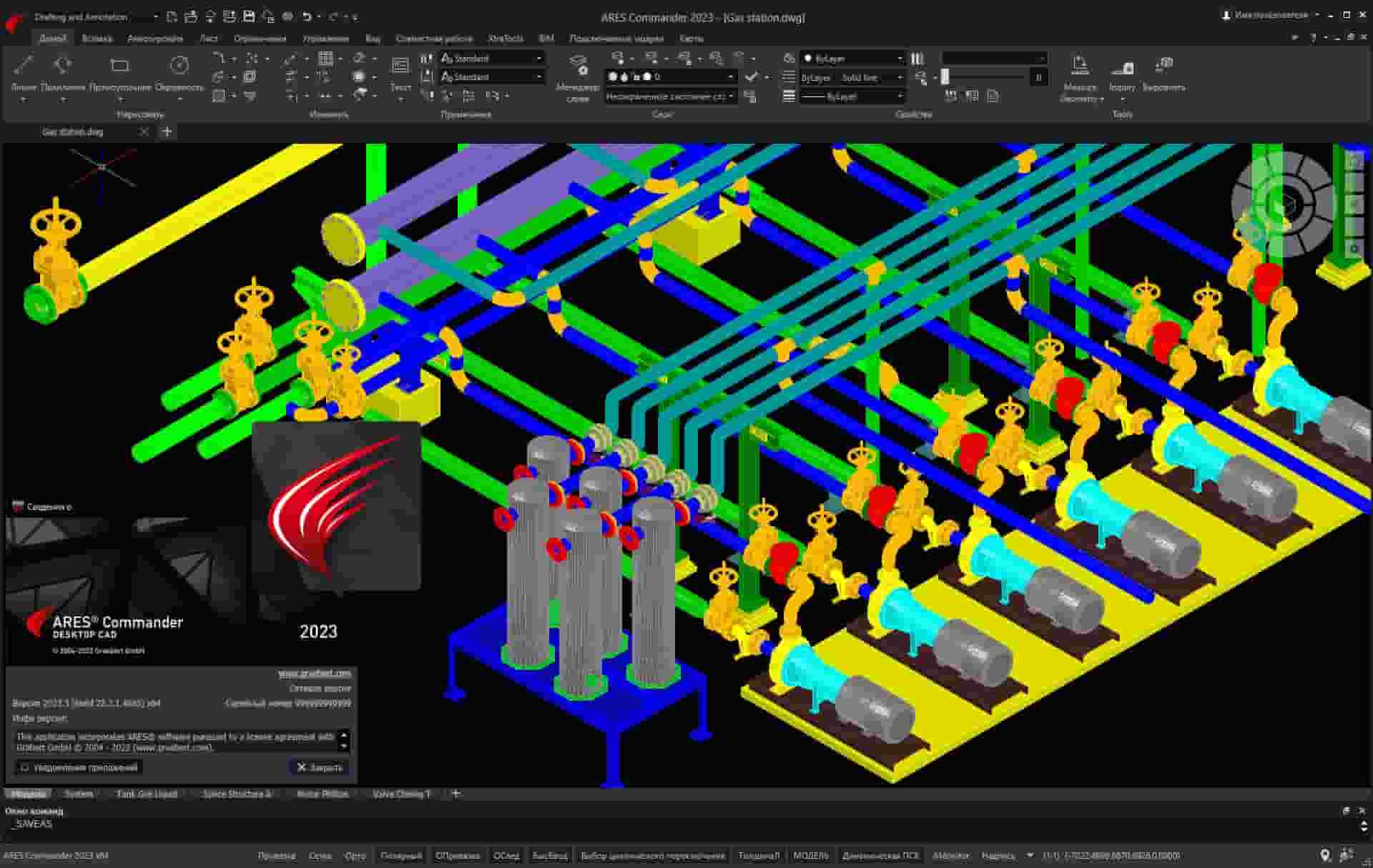
Download Graebert ARES Commander 2026.3.1 – Advanced CAD Software for Mechanical Design
Graebert ARES Commander 2026.3.1 is a versatile Computer-Aided Design (CAD) application developed by Graebert GmbH, engineered for professionals in design, engineering, and architecture. This professional-grade software is a powerful tool for creating detailed 2D and 3D models. Its robust feature set makes it particularly well-suited for complex mechanical and manufacturing applications, offering users a comprehensive solution for their design needs while maintaining seamless DWG compatibility.
Overview of ARES Commander
Introducing Graebert ARES Commander
Graebert ARES Commander functions as a sophisticated CAD platform designed to support a wide array of design and drafting tasks. Its primary purpose is to provide engineers, architects, and designers with an efficient environment for developing intricate 2D drawings and precise 3D models. The software is highly relevant in the mechanical design industry due to its in-depth functionality and support for industry-standard file formats, facilitating integration into diverse professional workflows.
Key Features and Functional Capabilities
Customization Options and API Integration
ARES Commander distinguishes itself through its extensive customization capabilities, enabling users to tailor the software to their specific project requirements. The platform supports a robust API (Application Programming Interface) that allows for integration with various programming languages, including LISP, VSTA (.NET), and C++. This extensibility empowers users to develop custom tools, automate repetitive tasks, and create specialized workflows, thereby enhancing productivity and precision in complex design processes.
Architectural Design and Engineering Applications
3D Modeling and Object Creation
The software offers comprehensive 3D modeling capabilities, leveraging the ACIS® solid modeler to create complex geometric shapes and assemblies. Users can develop detailed three-dimensional representations of their designs, essential for visualization, simulation, and manufacturing preparation. Its ACIS® solid modeler foundation ensures that even intricate objects are handled with precision, facilitating seamless integration into established CAD systems and workflows without compromising design integrity.
File Format Compatibility
Support for DWG and DXF Standards
Graebert ARES Commander ensures high interoperability through its native support for DWG files, the standard format for AutoCAD. This DWG compatibility means users can easily import, export, and edit DWG files from other CAD systems without data loss or conversion issues. Additionally, support for DXF (Drawing Exchange Format) further enhances its ability to exchange data across different software environments, a critical feature for collaborative projects in design and manufacturing.
User Experience and Interface Design
Intuitive Tools and Workflow Optimization
ARES Commander is designed with a focus on user experience, featuring an intuitive interface and a suite of tools aimed at optimizing design workflows. The software provides a clean, customizable workspace that allows users to arrange panels and toolbars according to their preferences. This user-centric approach, combined with features like multi-language support and context-sensitive menus, helps to streamline the design process, reduce learning curves, and boost overall efficiency for both new and experienced users.
Real-World Applications of ARES Commander
Case Studies and User Experiences
Professionals in various sectors leverage ARES Commander for critical design and engineering tasks. In manufacturing, it facilitates the precise design of components and assemblies for production. Architects utilize its capabilities for detailed building plans and 3D visualizations. Engineers rely on its robust feature set for infrastructure, mechanical systems, and product development. The software’s adaptability and precise modeling tools contribute to successful project outcomes across these diverse fields.
Conclusion
Why Choose Graebert ARES Commander?
Graebert ARES Commander stands out as a powerful and flexible CAD software solution. Its key differentiators include extensive DWG compatibility for seamless interoperability, robust customization options via its API supporting multiple programming languages, and advanced 3D modeling capabilities powered by the ACIS® solid modeler. These features, combined with an intuitive user interface designed for workflow optimization, make ARES Commander a strong choice for professionals in mechanical design, manufacturing, architecture, and engineering seeking an efficient and adaptable CAD tool.
Frequently Asked Questions
What industries can benefit from using Graebert ARES Commander?
Graebert ARES Commander is notably beneficial in industries such as mechanical design and manufacturing, architecture, and engineering, enabling professionals to create detailed 2D and 3D models with ease. Its comprehensive feature set supports the complexity required in these demanding professional fields.
Can ARES Commander read and write DWG files?
Yes, ARES Commander is fully compatible with DWG files, allowing users to read, write, and edit these files without any loss of quality, ensuring smooth integration into existing CAD workflows and maintaining data integrity.
What customization options does ARES Commander offer?
ARES Commander provides extensive customization capabilities through its API, supporting languages such as LISP, .NET, and C++, allowing users to create specialized functions and workflows tailored to their specific needs and project demands.




Reviews
There are no reviews yet.