

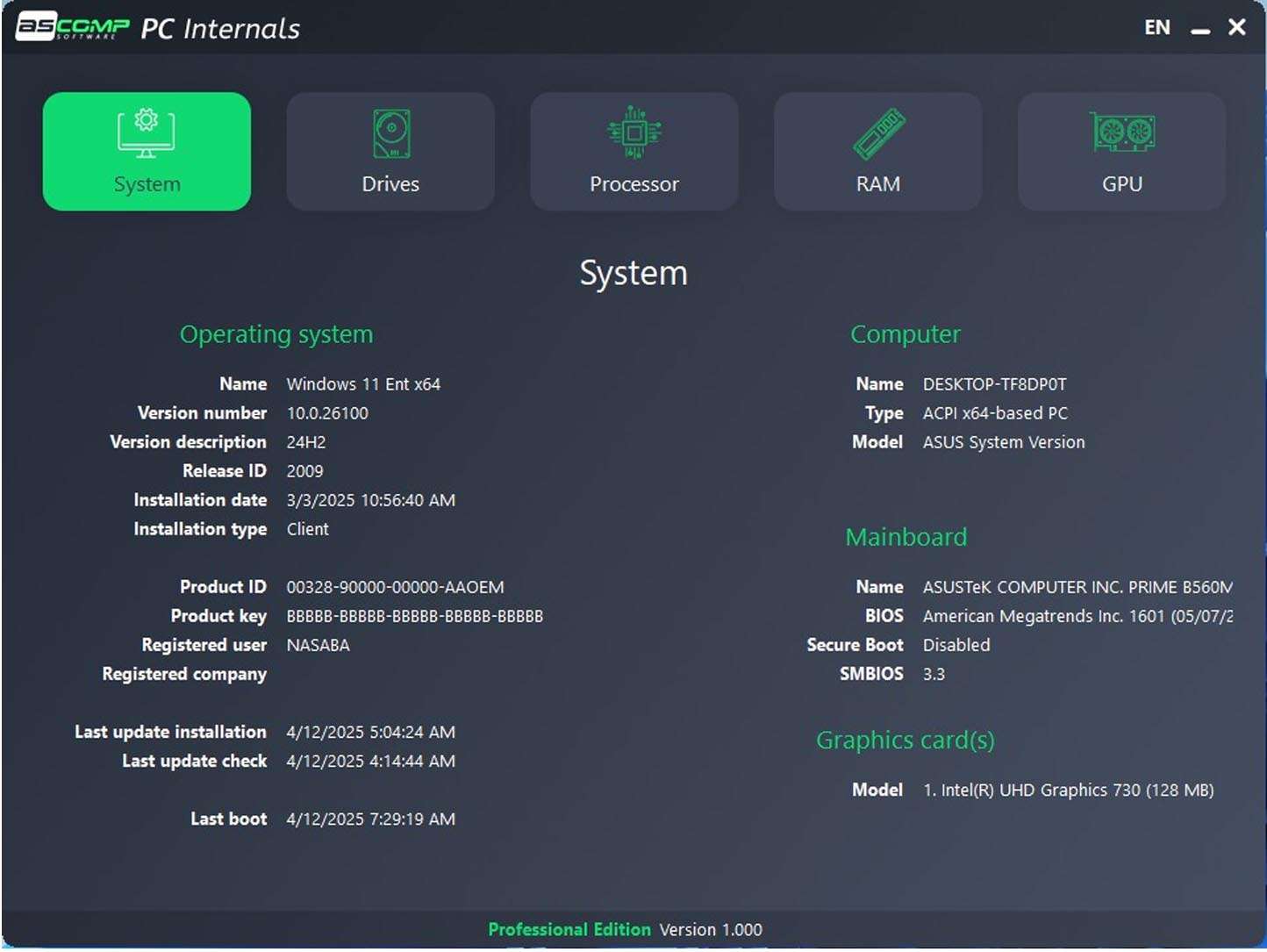
Download PC Internals Pro 2.003 – Advanced System Profiler and Diagnostics Utility for Windows
PC Internals Pro 2.003 is a specialized **PC Internals Pro system monitoring software** designed for deep examination of Windows PC hardware and system health. Developed for IT support, system administration, and hardware enthusiasts, it provides insights far beyond standard operating system utilities. This tool allows users to perform comprehensive hardware detection, monitor critical sensors in real-time, conduct rigorous stress tests, benchmark component performance, and generate detailed system reports.
An In-Depth View into Windows PC Hardware and System Health
PC Internals Pro functions as a sophisticated low-level system profiler and diagnostic utility. While Windows offers basic system information, this software delves into the intricacies of your PC’s hardware components. It is tailored for professionals and enthusiasts who require a granular understanding of their system’s configuration, operational status, and performance characteristics. The tool addresses the need for detailed diagnostics that are crucial in IT support environments and for users who build or upgrade their own systems.
Comprehensive Hardware Detection and Sensor Monitoring
The software excels in its ability to detect and report on a wide array of hardware components within a Windows PC. This includes detailed information on:
- Central Processing Units (CPUs): Model, core counts, clock speeds, and supported instruction sets.
- Motherboard Chipsets: Detailed chipset identification and associated hardware.
- Memory (RAM): Timings, module sizes, and speeds.
- Graphics Processing Units (GPUs): Model, VRAM capacity, clock speeds, and driver information.
- Storage Devices: Comprehensive S.M.A.R.T. data retrieval for hard drives and solid-state drives, including health status and error logs.
- Network Adapters: Identification of Ethernet and Wi-Fi hardware.
- Peripheral Devices: Recognition of connected USB devices and other peripherals.
Beyond static detection, PC Internals Pro offers critical real-time sensor monitoring. It tracks essential parameters such as CPU and GPU temperatures, system voltages, fan speeds, current clock speeds, and power consumption, providing a live view of the system’s operational environment.
Stress Testing and Stability Validation Tools
Ensuring system stability under demanding conditions is a core function of PC Internals Pro. The software incorporates specialized stress tests designed to push individual components to their limits. These include:
- CPU Stress Tests: To evaluate thermal performance and stability under heavy computational load.
- GPU Stress Tests: To assess graphics card stability and thermal management during intensive rendering tasks.
- Memory Tests: To detect errors and ensure RAM integrity.
- Storage Tests: To evaluate the responsiveness and stability of SSDs and HDDs.
These tests are crucial for identifying potential thermal throttling issues, validating system stability after hardware changes or upgrades, and diagnosing the root causes of system crashes or performance degradation. The tool helps professionals and enthusiasts confirm that their hardware can reliably handle sustained workloads.
Benchmarking and Performance Measurement Utilities
PC Internals Pro provides integrated benchmarking tools to quantitatively assess the performance of key hardware components. These utilities measure the speed and efficiency of the CPU, GPU, memory, and storage subsystems. By running these benchmarks, users can:
- Establish baseline performance metrics for their system.
- Compare their hardware’s performance against aggregated results or similar system configurations.
- Identify performance bottlenecks that may be hindering overall system speed.
- Validate that components are performing at their expected levels after installation or overclocking.
Interpreting these benchmarking results allows for informed decisions regarding system optimization and component upgrades.
Reporting, System, and Driver Information Insights
For record-keeping, troubleshooting, and inventory management, PC Internals Pro allows users to generate comprehensive system reports. These reports can be exported in various formats, including HTML, TXT, and XML, making them easily shareable among IT teams or accessible for future reference. The reports contain highly detailed information about the system’s hardware configuration, installed software, and operational status. Additionally, the software provides deep insights into the Windows operating system itself, detailing OS version, build information, system uptime, and critical service status. It also lists currently loaded drivers, running processes, and detailed resource utilization statistics, aiding in the diagnosis of software conflicts and performance issues.
Latest Enhancements in Version 2.003
Version 2.003 of PC Internals Pro introduces significant updates focused on expanding hardware compatibility and enhancing diagnostic capabilities. Key improvements include:
- Expanded Support for New Hardware: Includes detection and monitoring for Intel 14th and 15th Gen CPUs, AMD Ryzen 8000 and 9000 series processors, and NVIDIA RTX 40 Super series GPUs, alongside other recent hardware architectures.
- Enhanced Sensor Accuracy: Refined algorithms provide more precise readings for temperatures, voltages, and fan speeds across a broader range of motherboards and components.
- User Interface Redesign: A modernized graphical interface offers improved usability and clearer presentation of complex system data for technical users.
- Advanced Diagnostic Tests: New tests specifically target PCIe bus integrity and SSD controller health, offering deeper diagnostic insights into critical data communication pathways and storage device functionality.
- Stability Improvements and Bug Fixes: Addressed various stability issues and resolved bugs found in previous versions, ensuring a more robust and reliable user experience.
Use Cases for IT Professionals and PC Enthusiasts
PC Internals Pro serves a vital role in various technical workflows. Its comprehensive feature set makes it invaluable for:
- IT Support Technicians: Quickly diagnosing hardware failures, identifying thermal issues, and validating system configurations for clients.
- System Administrators: Performing remote or on-site hardware audits, monitoring server or workstation health, and troubleshooting performance problems in enterprise environments.
- Hardware Enthusiasts: Fine-tuning system performance, testing overclocking stability, and verifying component compatibility and operation.
- System Builders: Validating the stability and performance of newly assembled PCs before delivery to clients, ensuring all components work harmoniously.
- Benchmarking Professionals: Accurately measuring and comparing hardware performance for reviews, competitive analysis, or system optimization projects.
The software’s ability to provide detailed reporting and diagnostics aids in efficient troubleshooting of complex hardware driver issues, storage device health problems, and subtle performance degradations that are often missed by standard diagnostic tools.
Frequently Asked Questions
How does PC Internals Pro 2.003 differ from built-in Windows system tools?
PC Internals Pro offers much deeper low-level hardware detection and sensor monitoring compared to standard Windows utilities. It provides real-time thermal, voltage, and performance data, as well as stress testing and benchmarking capabilities absent in default tools. This allows for more detailed diagnostics and performance evaluations essential for professional use.
Can PC Internals Pro help diagnose hardware stability issues?
Yes, the software includes stress and stability tests for CPU, GPU, memory, and storage, allowing users to identify thermal throttling, instability, or failing components through targeted diagnostic routines. These tests help confirm system reliability under demanding operational loads.
Does PC Internals Pro support the latest PC hardware?
The most recent version 2.003 expanded support to include the latest Intel 14th/15th Gen CPUs, AMD Ryzen 8000/9000 series, and new GPU architectures like NVIDIA RTX 40 Super, ensuring compatibility with modern systems. This comprehensive support ensures accurate monitoring and diagnostics on contemporary hardware configurations.




Reviews
There are no reviews yet.