

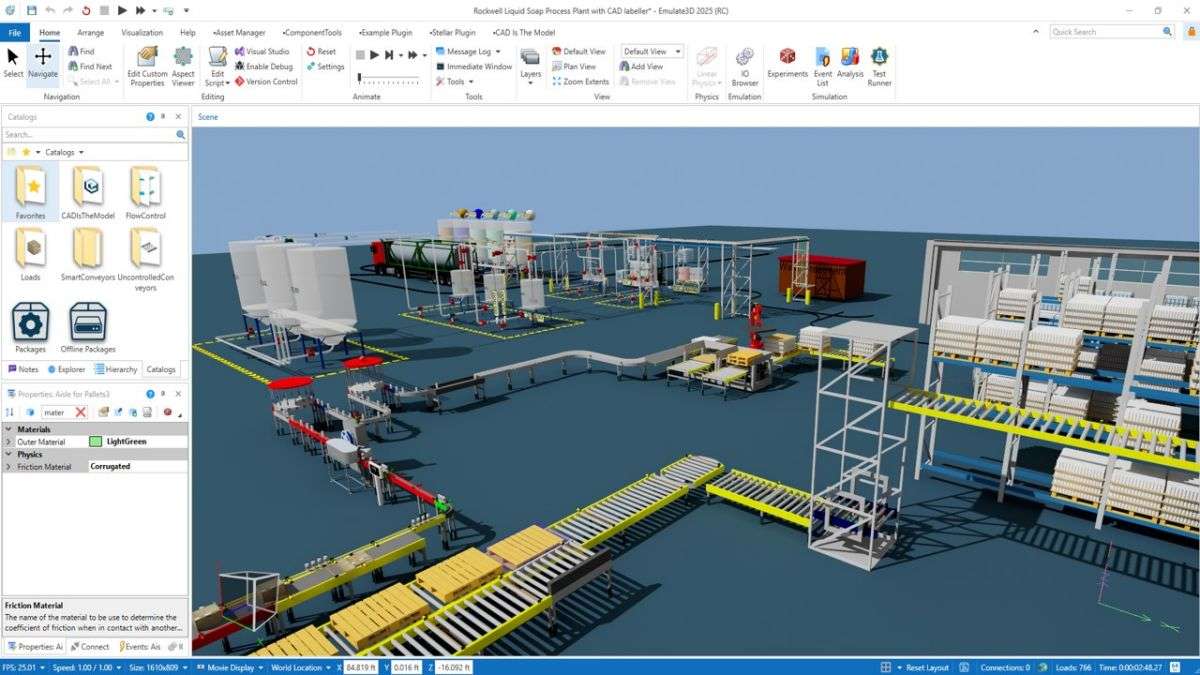
Download Rockwell Automation Emulate3D 2022 v15 – Industrial Automation Simulation and Digital Emulation Software
Rockwell Automation Emulate3D 2022 v15 is a specialized industrial automation software developed by Rockwell Automation, designed for digital design, emulation, simulation, and demonstration of complex material handling and manufacturing systems. This powerful application caters to industrial automation OEMs, system integrators, and professionals in manufacturing and material handling sectors, enabling them to create detailed digital twins for virtual commissioning and control system prototyping.
Overview of Emulate3D and Its Role in Industrial Automation
Emulate3D software serves as a crucial tool within the industrial automation landscape. It allows engineers and designers to build virtual models that precisely replicate real-world physical systems. By merging emulation, digital twin technology, and virtual commissioning capabilities into a single platform, Emulate3D provides a comprehensive environment for validating automation strategies. Rockwell Automation, a leader in industrial automation, developed Emulate3D to streamline the automation project lifecycle, from initial concept to final operator training, ensuring robust and efficient system development.
Capabilities for Simulation, Emulation, and Digital Twin Creation
Designing Virtual Models of Industrial Equipment
Emulate3D enables the creation of highly accurate virtual representations of industrial equipment and entire production lines. These digital models act as a foundation for various simulation and emulation tasks, allowing for detailed exploration of system behavior in a controlled virtual environment before any physical hardware is assembled or programmed.
Key aspects of virtual model design include:
- Replicating physical machinery, conveyors, robots, and other automation components.
- Defining system layouts and spatial configurations to match real-world installations.
- Simulating operational sequences and interactions between different machine elements.
- Visualizing system dynamics for design review and communication.
Virtual Commissioning and Performance Experimentation
A core function of Emulate3D is its support for virtual commissioning. By developing detailed digital twins, users can connect their control logic, such as PLC programs, to the virtual model. This allows for extensive testing of system capabilities, validation of control strategies, and experimentation with different operational scenarios. This process helps identify potential issues and optimize performance without risking damage to physical equipment or causing production downtime.
Benefits of virtual commissioning with Emulate3D include:
- Extensive PLC program testing and debugging in a realistic environment.
- Validation of machine safety functions and interlocking logic.
- Optimization of cycle times and throughput based on simulated performance.
- Reduced troubleshooting time during on-site commissioning.
Integration with MATLAB and Advanced Co-simulation Features
Emulate3D offers advanced integration capabilities designed to enhance automation system prototyping and validation. A notable feature is its plugin that allows for integration with MATLAB, empowering users to develop and test PLC programs using MATLAB scripts. This extends the software’s utility for complex control system development and experimentation.
Further co-simulation capabilities are supported, including integration with Simulink and Simscape models via the Functional Mock-up Unit (FMU) standard. This enables multi-domain system simulation, where different aspects of a system can be modeled and simulated in conjunction with the Emulate3D environment, providing a more holistic approach to system design and verification.
Applications Across Automation Project Lifecycle
From Concept Design to Operator Training
Emulate3D’s comprehensive feature set makes it valuable throughout the entire automation project lifecycle. It assists in the early stages by facilitating concept modeling and design communication, helping stakeholders visualize proposed systems. During the development phase, it supports control code development and testing, significantly shortening the time required for validation.
Further applications include:
- Creating realistic virtual environments for operator training, improving workforce proficiency and safety.
- Validating system integration before physical installation to avoid costly errors.
- Providing a platform for experimentation and optimization of automation logic and system performance.
- Supporting project documentation and client demonstrations with accurate virtual models.
Industry Use Cases and Benefits
Emulate3D is instrumental for various sectors within industrial automation. Automation OEMs and system integrators leverage the software to design, test, and deliver complex automated systems more efficiently. Manufacturing and material handling companies utilize Emulate3D for optimizing production lines, validating new equipment integrations, and enhancing operational strategies.
Practical benefits derived from using Emulate3D include:
- Reduced physical prototyping costs by extensive use of digital twins.
- Minimized risk of errors during on-site commissioning through pre-deployment validation.
- Accelerated project timelines by shifting testing and validation to a virtual environment.
- Improved quality and reliability of automated systems due to rigorous testing.
- Enhanced operator training leading to safer and more efficient plant operations.
Comparison with Other Automation Simulation Tools
While many tools offer simulation capabilities, Emulate3D distinguishes itself by integrating emulation, digital twin creation, and virtual commissioning within a unified platform. Its specific support for connecting directly to physical control hardware alongside virtual models, and its out-of-the-box integration with MATLAB for PLC program prototyping, offer an advantage for streamlined automation project workflows.
Frequently Asked Questions
How does Emulate3D help in reducing commissioning time for automation systems?
Emulate3D enables virtual commissioning through detailed digital twins, allowing engineers to test and validate control systems and machine interfaces before physical deployment, significantly reducing on-site commissioning time and associated costs.
Can Emulate3D integrate with MATLAB and other simulation tools?
Yes, Emulate3D integrates with MATLAB using a plugin that allows MATLAB scripts to prototype and test PLC programs. It also supports co-simulation with Simulink and Simscape models via FMU integration, enhancing its analytical and simulation capabilities.
What industries commonly use Emulate3D for automation simulation?
Emulate3D is widely used in industries including manufacturing, material handling, and by industrial automation OEMs and system integrators for designing, simulating, and commissioning complex automation systems.




Reviews
There are no reviews yet.