

Download LabelJoy All Edition 6.23 – Professional Label Design & Barcode Software
LabelJoy All Edition 6.23 is a specialized label design and barcode generation software developed to streamline the creation of professional labels for various business needs. This application is particularly valuable for professionals in retail, e-commerce, manufacturing, warehousing, and event management, as well as for general office administration and small businesses requiring product labeling solutions.
Introducing LabelJoy’s WYSIWYG Design Studio
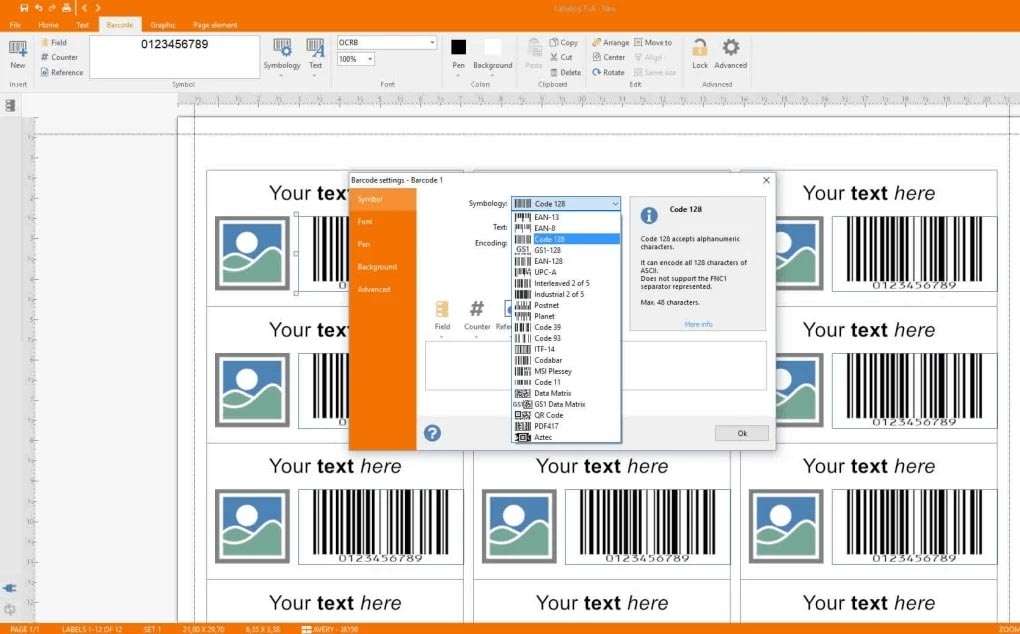
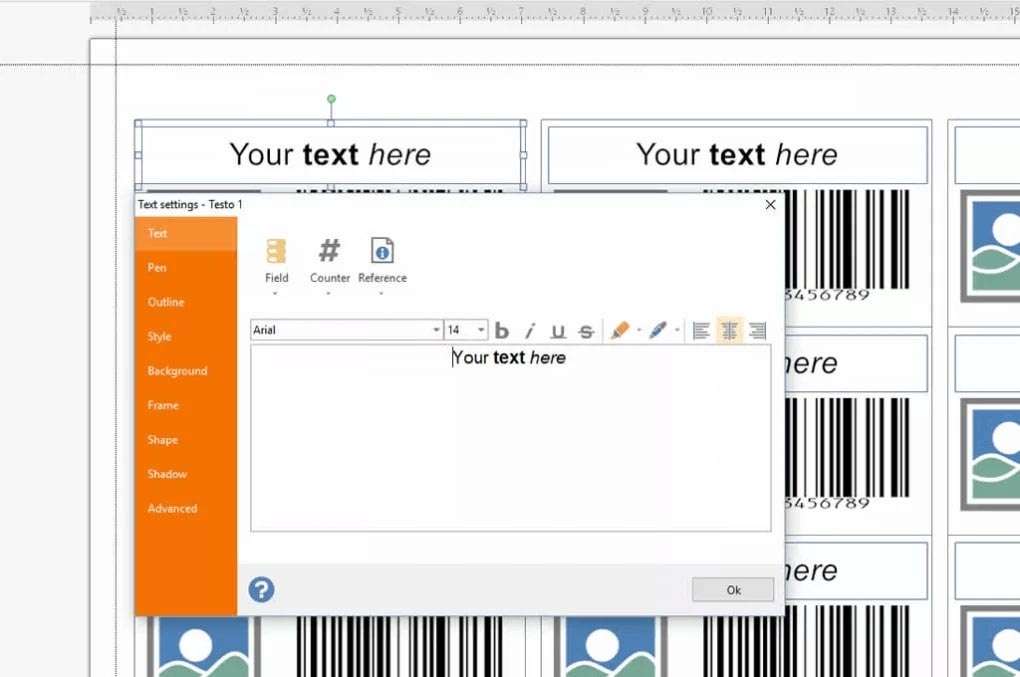
LabelJoy features an intuitive WYSIWYG (What-You-See-Is-What-You-Get) interface designed for ease of use without sacrificing professional capabilities. This drag-and-drop environment allows users to design labels directly on screen, with a real-time preview that eliminates guesswork. Whether you are a beginner or an experienced designer, the user experience is crafted to be efficient, enabling quick creation and modification of label layouts.
Advanced Barcode Generation and Customization
The software offers robust capabilities for generating and customizing a wide array of barcodes essential for inventory management, product identification, and shipping. Users can integrate these codes seamlessly into their label designs.
Comprehensive 1D Symbologies
LabelJoy supports an extensive range of linear (1D) barcode symbologies, including industry standards such as Code 39, Code 128, EAN-13, UPC-A, ISBN, and Interleaved 2 of 5. This broad coverage ensures compatibility with most retail, library, and industrial scanning systems.
Robust 2D Barcode Options
For applications requiring more data storage or advanced functionality, LabelJoy integrates support for major two-dimensional (2D) barcodes. This includes QR Code, Data Matrix, PDF417, Aztec codes, and MaxiCode. Users can configure symbology-specific settings like checksum validation and quiet zone dimensions directly within the design environment.
Seamless Data Integration for Batch Labeling
To facilitate efficient batch label production, LabelJoy provides flexible data integration options. The software supports connectivity with various external data sources, enabling mail-merge functionality for personalized or variable data labels. Users can manage large sets of data for printing hundreds or thousands of unique labels with ease.
Direct connections can be established with common data sources such as Microsoft Excel spreadsheets, CSV files, Microsoft Access databases, and SQL databases. The mail-merge workflow allows users to map data fields to specific elements on their label template, and robust record filtering and sorting capabilities ensure that only the required data is processed.
Exporting and Printing Across Environments
LabelJoy is engineered for versatile output, catering to a wide range of printing hardware and media types. The software ensures that label designs are rendered accurately across different printing environments, from standard office setups to specialized industrial printing solutions.
Compatibility extends to standard office inkjet and laser printers, as well as advanced thermal transfer and industrial label printers. The software supports both roll-fed and sheet-fed media, and offers features for batch sequencing and print job management, making it suitable for high-volume label production and distributed printing workflows.
Leveraging Built-in Graphics and Clipart Library
To enhance label design and expedite the creation process, LabelJoy includes a comprehensive library of royalty-free clipart. This library contains a variety of graphics categorized for common business and product labeling needs.
In addition to the built-in assets, LabelJoy supports the import of various image file formats, including BMP, JPG, PNG, GIF, and TIFF. For designs requiring scalable graphics, the software also handles vector formats such as Enhanced Metafile (EMF) and Windows Metafile (WMF), ensuring high-quality graphics output regardless of the printer resolution.
Real-World Use Cases Across Industries
LabelJoy’s versatility makes it applicable across numerous sectors, providing practical solutions for everyday labeling challenges. Its features are designed to meet the specific demands of different industries.
- Retail & E-commerce: Generating price tags, product labels, promotional stickers, and shipping labels.
- Manufacturing & Warehousing: Creating asset tracking labels, inventory management tags, serial number labels, and shelf labels.
- Event Management: Designing attendee badges, name tags, directional signage, and promotional materials.
- Office Administration: Producing file folder labels, shipping labels, and internal mail tags.
- Small Business: Crafting product packaging stickers, branding labels, and small-batch custom prints.
Enhancements in LabelJoy 6.23 Build 07.14
The latest release, LabelJoy All Edition 6.23 (build 07.14), introduces several refinements and performance improvements to further enhance user productivity and software functionality. These updates focus on expanding capabilities and optimizing the user experience.
- Added support for new barcode symbologies, increasing the already extensive coverage.
- Implemented significant speed improvements for importing data from external databases, accelerating batch processing workflows.
- Introduced subtle UI refinements for a more streamlined and intuitive user experience.
- Overall performance boosts and stability enhancements for more reliable operation, especially during complex labeling tasks.
Frequently Asked Questions
What barcode symbologies does LabelJoy support in version 6.23?
LabelJoy All Edition 6.23 supports over 20 1D barcodes—such as Code 39, Code 128, EAN-13, UPC-A—and major 2D codes including QR Code, Data Matrix, PDF417, Aztec, and MaxiCode. You can adjust dimensions, checksums, and quiet zones in real time directly on the label design canvas.
How can I connect LabelJoy to my Excel or SQL database for batch printing?
Within LabelJoy’s Data menu, choose “Import External Data,” select your CSV, Excel, or SQL source, and map your fields to label elements. You can filter, sort, and preview records before executing a mail-merge for hundreds or thousands of labels, ensuring accurate data representation.
Can I see exactly how my labels will print before sending them to the printer?
Yes. LabelJoy’s WYSIWYG editor provides an on-screen, high-fidelity preview that mirrors the printer output—no separate preview mode is needed, ensuring what you see is precisely what prints, reducing waste and ensuring accuracy.




Reviews
There are no reviews yet.